
Awesome video on design thinking:
Awesome video on design thinking:
Takeaways from this week’s Breaking Smart newsletter, Betting the Spread on Inexorables:
Great stuff on marketing from my coworker Derek Magill:
“Hold off on new marketing efforts and let’s fix your funnel first.” Oftentimes the most promising “marketing” strategy is not to focus on growing awareness and traffic, but in making the most of the existing awareness and traffic you already have.
Read his full post here. Scroll down to May 5: Awareness vs Activation.
“Writers write every single day.” “If you aren’t writing code every day, you can’t call yourself a developer.” “The best in every field get up at 4am and start working by 6am after a workout and an hour of reading.”
Rules are so fun to state. They make you look hardcore, driven, and disciplined. But if you are on the other side of that exchange and are the one hearing those rules, ignore them.
Seriously, fuck those rules.
Don’t get me wrong, I love hearing about people’s processes. I love reading books like Daily Rituals. But you won’t get anywhere by worrying about following someone else’s process. You have to figure out with works for you and be ruthless in following it.
I personally see a lot of benefits of showing up and doing things daily. I don’t wait for inspiration to find me, I spend time consuming great stuff and thinking about it. I’ve recognized that I need space to think, walk, read, and listen. Inspiration always comes, and when it does, I’m ready.
That said, I don’t stress out too much over it. While I do get stuff done every day, that isn’t necessarily when my best work hits me. Sometimes I’ll have weeks where I get tons of ideas and am excited to work on some cool stuff. For example, I had the idea to build this WordPress theme this week. This is the first full WordPress theme I’ve done all on my own. I couldn’t get it out of my head until I got the templates done and shipped it. My Jekyll blog template was the same way last year. So was the Sol LeWitt project, the Slack Toggl slash command, the Apple Photos analysis project, and the Cocktail library.
Other times I’ll go a few weeks without being moved to do anything beyond the daily tasks I’ve set for myself. I’ve learned to be okay with that. Fuck what works for other people. These are my projects.
What I can never forgive myself for, though, is not doing the work when I feel the call.
Not following the traditional rules is totally fine. What is inexcusable is not staying true to your own terms and getting your work done.
Cool writing prompt from Cheryl Strayed on the Tim Ferriss Show: Pull out your keychain and write about the history of each key. https://overcast.fm/+BmGWAa3Lc
I just made a WordPress theme made to be used with Micro.blog. It is simple, minimalist, and includes a small tool to verify your site with Micro.blog. You can download or fork it here: https://github.com/cagrimmett/simplemicroblog-wp
Testing out this Twitter cross-posting bot from http://micro.blog/cagrimmett
Yesterday Amanda and I visited Great Falls in Paterson, NJ.

Testing a new post from Micro.blog’s iOS app.
I got a tip today from a Persian chef about cooking rice the Persian way: After it boils for a few minutes, drain and rinse it. Then put it back in the pot for 25 minutes. You get a nice crispy layer at the bottom and rice that is completely separated, not gummy.
Check out Leonard E. Read’s sweet bookplate that I found:

The best projects are ones that build something you want to use or solve a problem you actually have. They don’t need to be big or new. Almost every project starts out as small and a remix of something else. Then you take it and build on it.

I’ve spent the last month blogging every day, but this isn’t the first time I’ve regularly put stuff out online. I posted every single day in 2010 and I’ve averaged a post a week since 2011.
Here are some strategies I use to create content consistently. This applies to writing, painting, podcasting, and other creative endeavors.
When you have an idea, stop and get it down. If you have move things around enough to write the full post, that is great. If not, spend 5 minutes making an outline that you can flesh out later.
Amanda and I have made this a regular part of our lives. It is not uncommon for us to pause our conversation in the middle of dinner to get down bullet points that we can return to later.
Getting over your fear of shipping is necessary to producing content consistently.
I don’t have a lot of advice here other than:
Bo knows this (what?) and Bo knows that (what?)
But Bo don’t know jack, cause Bo can’t rap
I reread The War of Art or Turning Pro, both by Steven Pressfield, at least once a year to get back on track with shipping.
When you are tired and don’t want to produce, any barrier can be turned into an excuse to wait until the next day. Remove as many barriers as you can.
Take every piece of your creative process and remove as much friction as possible. Creation shouldn’t be something that only happens when the stars align. The easier you make it to get to work, the more work you’ll get done.
Everything you do in your daily life presents you with a chance to create. Writing is the most obvious because you can write about situations, problems, and things you’ve learned. You can also apply this to other forms of creation:

Whenever I have an idea for a post but can’t write it immediately, I put it in my Blog ideas Trello board. I have a list for each blog I can post to. If I have an outline, I put it in the comments.
I bet visual artists, podcasters, journalists, and creators of all types could do the same thing with their craft.
Playing the long game can mean two things:
Here are some cases where I’ve played the long game on Cook Like Chuck:
I also love creating personal cheatsheets. Every time you have to look something up, explain it in your own words and add it to a note or document. You can publish these over time. Here are a few I’ve made:


Twice a day the waters of the Atlantic rise higher than the levels of the Hudson. At high tide, salt water pushes up the Hudson, raising the water levels. When the tide goes back out, the Hudson switches back to its normal flow direction back out to sea.
The salinity levels vary by location and time of year. In the spring, the fresh water line is around Yonkers. At the end of summer, the river is salty all the way up to Newburgh.
Maryland isnât the only place that has blue crab. Commercial and recreational fisheries up and down the Hudson catch blue crab from June through October.
They migrate up the river in the summer to feed as the salt line moves further north, then they migrate back into saltier waters by the bay in the winter.
I regularly see blue crab around marshes at low tide in Yonkers in the summer.
The Tappan Zee Bridge, which goes from Rockland County to Westchester County near Tarrytown, is at the Hudsonâs second-widest point, even though the river gets much narrower closer to NYC.
The reason that the location neat Tarrytown was chosen was because it is just outside of Port Authorityâs 25 mile jurisdiction. That means toll revenue would go to New York State, not Port Authority.
When the Union Navy build the ironclad USS Passaic, they needed a safe place to test its cannons. They picked the New Jersey Palisades. On November 15, 1862, the crew sailed the ironclad up the Hudson and pointed its cannons at the rock cliffs. As James M. Madden writesArchived Link,
It misfired several times, to the amuse- ment of those officers aboard who had predicted that the shipâs turret design would interfere with effective gunnery. And then, on the fourth attempt, the Dahlgren fired. That first round splintered the rock wall and produced a massive echo that witnesses likened to the explosion of a powder mill. Despite the noise, the navy was satisfied, as there was no concussion or smoke inside the shipâs gun turret, despite dire predictions from critics. Three more shots produced as many more echoes and showers of shattered rock. An Irishman aboard, awed by the destructive demonstration, declared the Passaic a âfloating divil.â
Oyster beds once stretched from the mouth of the Hudson all the way up to Tarrytown. Due to pollution and overfishing, theyâve been almost absent for the last few decades.
Good news: The river is cleaner now than it has been in decades and at super low tides, you can see evidence of oyster beds making a comeback.

We all understand the importance of setting deadlines at work. Everything revolves around intentionally set deadlines and there are consequences if they aren’t met. Deadlines are a useful tool at work to keep progress moving forward. If there were no deadlines and no consequences for missing them, how many projects would realistically get done?
Apply the same thinking above to your personal life: If you don’t intentionally work at improving yourself, how can you expect that improvement to happen?
At Praxis, our favorite self-improvement tool is the PDP: A self-chosen 30-day challenge with tangible benchmarks and outcomes. The best PDPs involve doing something tangible every single day for 30 days. These daily deadlines, if taken seriously, produce results.
Here are my PDPs so far for this year:
You don’t necessarily commit to doing something every day for 30 days. I like doing it because it leaves no room for excuses. That said, it isn’t for everyone. Some people work better with weekly goals so they can dedicate their weekends to it. Others like to dedicate one morning or evening each week to self-improvement projects.
No matter which path you choose, remember these two keys to self-improvement:
Like any good manager, don’t fire yourself when you miss a deadline. Make sure you are falling forward, identifying why you missed the deadline, and put systems in place to make sure it doesn’t happen again.
Consider this quote on goal setting from HBR:
Maybe you are the sort of person who finds it hard to motivate yourself to take on such goals. If that’s the case, taking a flexible approach might be best for you.
I don’t think that flexible goals are good for anyone. They signal that:
We are capable of more than we give ourselves credit for. Set rigid goals and give yourself the chance to rise to meet them. That is what growth is about.
We don’t get ahead by being easy on ourselves. We don’t get ahead by going through the motions. We get ahead by intentionally working on things that improve our skills and abilities.
Set clearly defined personal deadlines and hold yourself accountable for meeting them.


Two weeks ago I had a problem I wanted to solve with Zapier: Only running a particular Zapier action during business hours and delaying everything that happens outside of business hours until the next day.
I tried multiple approaches to make this happen, but each one fell short:
Zapier is really great at handling linear workflows (if X happens, then do Y), but it isn’t really set up to handle nested workflows (if A, then 1, else if B, then 2, else if C, then 3). In order to correctly handle only running zaps during business hours, individual zaps would need to have nested logic. This is unlikely to happen on Zapier any time soon, so I thought I was out of luck.
After thinking about it for a few days, it hit me: Why not use two different zaps simultaneously? As long as the zaps are configured in a way that one always works and the other one always gets filtered so they never conflict and duplicate actions, it can work! Yes, this doubles your zap usage, but it is a great way to get around not having nested logic in individual zaps.
By combining the Date/Time formatter, Only continue if… filter, and the Delay Until action with different settings in two different zaps, I achieved what I wanted.

Here is a sketch of the solution I’m using:
After the trigger (a form submission), I immediately set up three actions:

2. Zapier’s Only Continue If filter to check the time of the previous step and only allow it to continue if the time is before 17:00. Anything that happens after 17:00 gets to this point in the zap and stops.

3. Zapier’s Delay Until action to delay actions until 08:00.
The way that the Delay Until action works is that if the time is before your specified time, the action will be delayed until the time you specified. If the current time is after the time you specified, the action will continue immediately. Understanding this ended up being the key to this workflow design.

Everything else I want to occur during business hours comes after this step in the zap.
For 17:00 through 23:59, I use the same three actions and filters, but with different settings.

3. Zapier’s Delay Until action to delay all further actions until 08:00 the following day.

Both zaps get triggered from the same form submission. The way we’ve set them up, one of the two zaps will always run and the other will always get filtered out by the “Only continue if…” step. Our cutoff point is 17:00. Whatever happens before 17:00 gets handled by Zap 1 and Zap 2 gets filtered. Whatever happens after 17:00 gets handled by Zap 2 and Zap 1 gets filtered.

Here are resources for WordPress users who want to use HTML and CSS to alter the structure, look, and feel of their themes, posts, and pages.

HTML is primarily for structure. HTML is the base level of most what you see right now in your internet browser. In order for any CSS or Javascript to work on content, that content must be first wrapped in an HTML tag.
CSS is primarily for presentation. CSS is essentially a shorthand way of giving instructions to HTML tags on how they should look and where on they page they should show up. CSS does include some behavioral interactions components like hover and on-click actions.
Javascript is primarily for behavioral interaction, but its scope has grown significantly in the past few years. We won’t cover Javascript in this guide. It requires its own guide, which will come later.
My favorite resource for learning the basics of HTML and CSS from scratch is W3Schools. Their examples are clear and they have widgets where you can test out the syntax and poke around what already works to learn more.
Here is the W3Schools HTML tutorial. I recommend completing the HTML HOME through HTML Symbols. This will cover 95% of the HTML you will encounter in WordPress.
Here is the W3Schools CSS tutorial. I recommend completing CSS HOME through CSS Forms. This will cover the basics of the CSS that you will see in WordPress. Pay particular attention to the Box Model. Once you feel comfortable with the basics, feel free to move on to the CSS 3 section, which builds on the basics.
After you’ve gotten your feet wet with W3Schools, test your knowledge by working your way through Codecademy’s HTML and CSS course.
The best way to learn HTML and CSS is by actually writing it, refreshing the page, and seeing what happens. A good rule is to spend 3 hours applying for every 1 hour reading/taking notes.
Get yourself an easy-to-use text editor like Atom, make a new file names hello.html, and then start writing. After you’ve written your first line, save the file and open it in your web browser to admire your handiwork.
Then go back to Atom, make some changes, save, and then hit Refresh in your browser. Repeat.
To find which style definitions and HTML tags apply to what you see on your favorite websites, learn how to use Chrome’s debugger to find them. After a little practice you’ll be able to quickly identify the underlying markup and apply your own overrides and fixes.
You’ll primarily use HTML in the content editor of Posts and Pages. When you are editing a post or a page, the editor has two options: Visual or Text. Visual comes up by default. If you switch over to the Text tab, you’ll see that your headers, lists, etc are marked up with HTML:
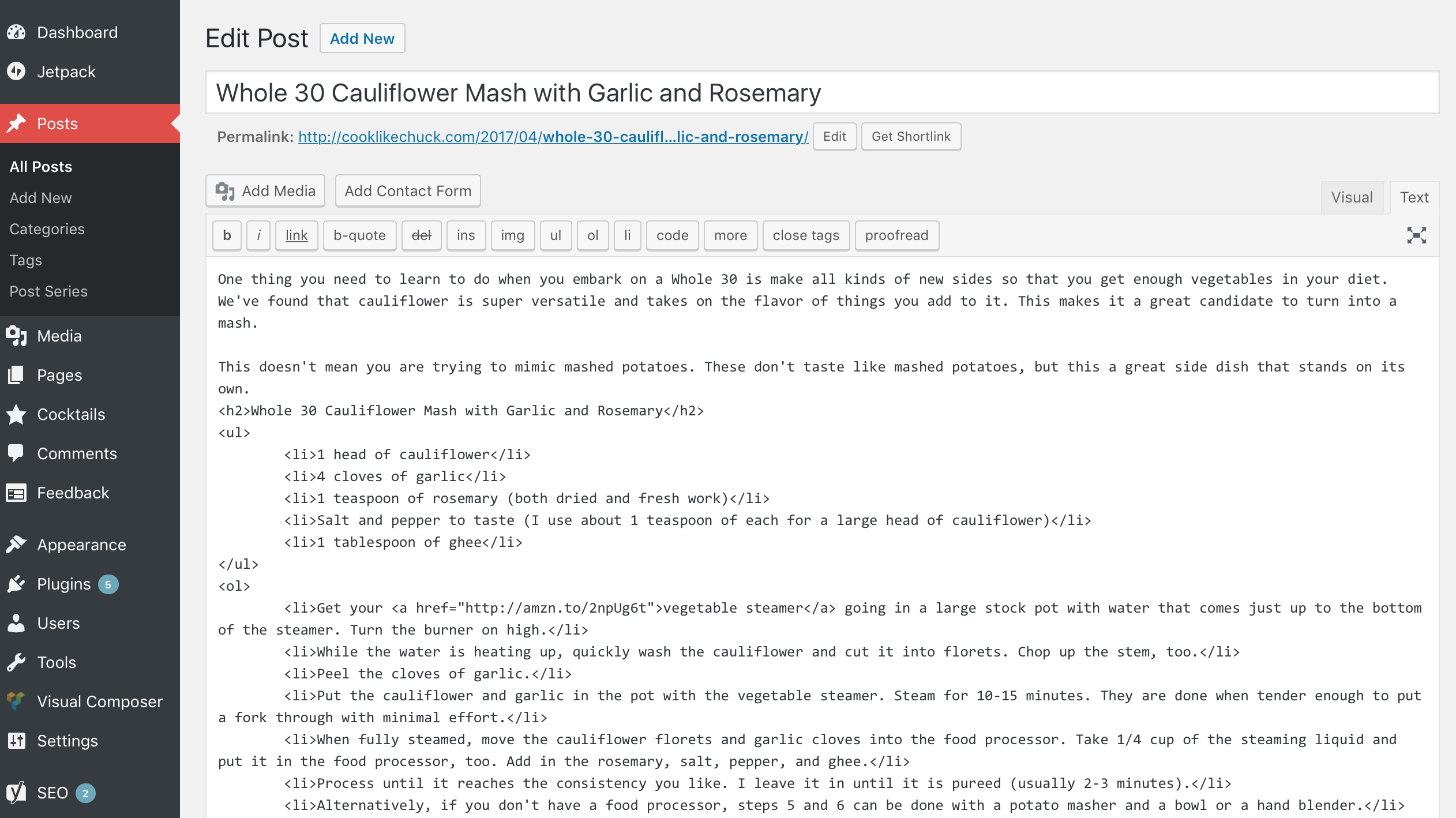
CSS is usually defined and applied in the style.css file inside your WordPress theme folder. That said, if you are just starting out, I recommend you leave the style.css file alone and install the Jetpack plugin. It includes a module for adding custom CSS to your theme. There are two benefits for doing it this way:
style.css might take some time to show up. Changes applied via Jetpack’s CSS module take effect as soon as they are saved. These changes are also usually applied last, so they take precedent over what is defined in your theme.The free version of the Jetpack plugin is all you need. Once it is installed, you can click “enable recommended options” and the CSS module should be included in that. If it isn’t, go to Jetpack > Settings > Appearance and toggle on Custom CSS.
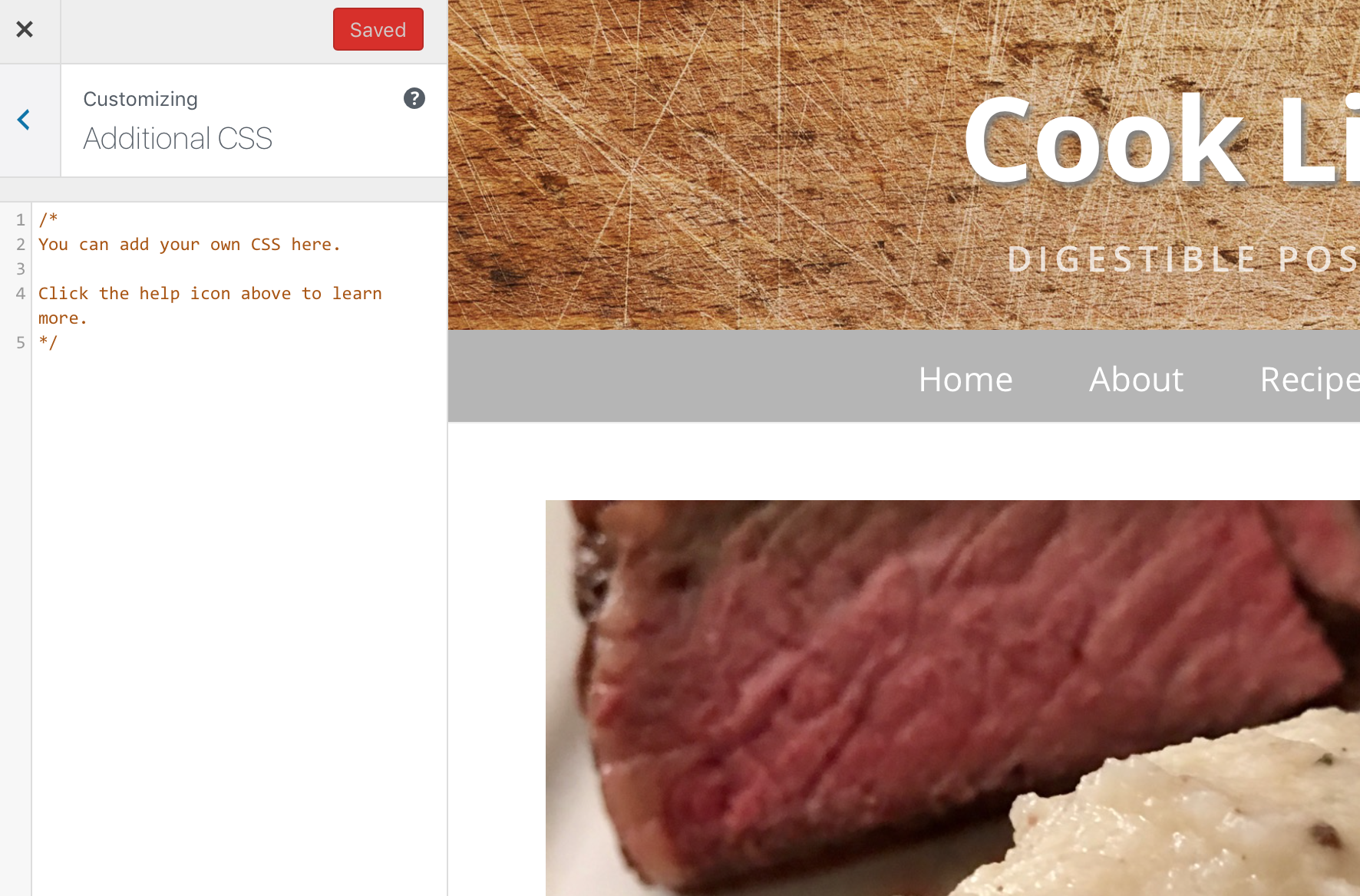
Once it is turned on, you can go to Appearance > Customize in your WordPress Admin sidebar. In the Customizer you’ll see an area for Additional CSS:
If you have any questions, drop them below in the comments! Or, you can ask them on Stack Overflow and Quora like the rest of the web does 🙂

“Send a thank you note” is one of those pieces of common wisdom we always hear, yet an astonishingly low number of people actually do it.
Let me give a recent example of how a thank you note (even a digital one!) can shape someone’s view of you.
Over the past few weeks I emailed the same message to two different groups.
Group A is generally earlier on in their careers. Group B is generally more established in their careers. The email content, open rates, and link clicks were the same, but what stuck out to me was how differently the two groups acted after logging in. Only 2.4% of group A sent me a note afterward, whereas 55.5% of group B sent me a note afterward.
The majority of group A read and archived the email. The majority of group B took the interaction as an opportunity to build some social capital.
I didnt expect a reply and I don’t think less of those who didn’t reply. I don’t want to be presumptuous and think I’m important enough to warrant a reply. Heck, there are dozens of emails I just read and archive without responding to every single day.
That said, those who did reply gained some social capital with me. They stick out because they did something very few others took the time to do: Send me a nice note. With a 30 second email, they changed the way I think about them. I haven’t met any of them in person and I don’t interact with them on a daily basis, but I’m willing to go out of my way for those who did actually reply the next time they need help with something.
There is a strong correlation between those who replied and career success (even early in their careers). They know that consistently doing little things to build social capital makes asks and connections easier in the future. Most in group B (and a few in group A) have learned this lesson and made doing little things like this part of their standard operating procedure.
Even though sending a thank you note is common wisdom, few people go through the trouble of actually doing it. With Praxis, I work with a lot of bright young people. Most, even the ones who excel, never send a thank you note. The minority who do stand out.
What opportunities are you missing because you didn’t take 30 seconds to say thanks?
A big thanks to Isaac Morehouse for regularly encouraging me to follow this principle and for his notes and suggestions on an early draft of this post.


I field a lot of questions. I’m sure you do, too.
In a single day I might get asked about technology recommendations, programming syntax, software integrations, business processes, locating files, and how to set up WordPress. I don’t mind answering these questions, and I try to do so quickly and politely.
Here’s the kicker: At least 80% of these questions can be answered with a simple web search. There already dozens of tutorials, Stack Overflow threads, Quora answers, blog posts, FAQs, and documentation sections covering these topics that can be reached in a few clicks. Most of the time the person asking has not made any attempt to answer the question themselves. I consider these stupid questions.
Back in 9th grade, I asked Mrs. Dispenza a history question while I was doing my homework. She politely asked, “Where have you already looked to find that answer?” I sheepishly admitted that I hadn’t looked anywhere. What she said next has stuck with me ever since:
“You should never ask someone else a question without first attempting to answer it on your own.”
Of course there are exceptions to this. Someone assisting a surgeon in the middle of a surgery shouldn’t stop to research the best way to stop bleeding, he should just ask the surgeon. Sometimes asking a veteran staff member the best process for doing something is better than spending an hour figuring it out through trial and error. There are costs and benefits to every decision. Make sure the comparison lands on the “benefits” side of that scale if you are using someone else’s time and energy.
Before you ask someone a question in the future, follow this mental checklist to make sure it isn’t a stupid question:
If your first instinct is to tell someone they should have looked the question up before asking you, The Dude has a message for you:

Always answer the question politely and quickly. Be nice and be helpful. Don’t be an asshole.
Tensions run high when money and reputations are on the line, so clear thinking is rare during a crisis. When there is a crisis unfolding and someone asks you for help, step in, stay calm, and fix the problem. Don’t waste time teaching people how to research and solve issues on their own–you’ll only frustrate yourself and everyone else.
Follow up afterward with an after action report for the person or team. Detail what happened, what caused it, what the solution was, and what can be done to prevent this issue in the future. Also suggest some resources the person or team can study before the next crisis hits so that they will be better equipped to respond. This report should be added to your documentation or knowledge base. It will likely help everyone in the future.
After answering the question, pass along a book, article, video, or a guide where the questioner can learn more and refer to later.
If the same person asks the same question again in the future, consider responding, “Hey, I remember that we talked about this last week. Did you check out the blog post I sent you? Here is that link again: http://example.com/blog-post/”
Sometimes dialoguing leads people to answer their own question and sometimes it helps me figure out the source of their misunderstanding. I like to ask,
If you keep getting the same questions over and over, your company or your project might need better documentation. This can come in many forms: Training materials, FAQs, instruction manuals, user guides, standard operating procedures, a wiki, etc.
If you have documentation, keep it up to date and make sure that all staff are kept up to date on additions and changes. Everyone needs to know it exists and referring to it needs to become part of the culture. If you don’t have documentation, make it a priority to write some! Documentation is everyone’s responsibility, not just HR’s.
Did you know that you can take screenshots on most recent Kindles? This is useful for quickly sharing a passage, showing an editor or developer a display issue, and sharing tips in an article like this one.
To take a screenshot, tap on opposing corners at the same time.
https://gfycat.com/PointlessDistantDiamondbackrattlesnake
To retrieve these screenshots, connect the Kindle to your computer via USB. The screenshots will be saved in the main folder as .png files.
I’ve wanted reading statistics on my Kindle for a long time. It wasn’t available in the main settings, so I gave up on it and kept track of my reading on my own.
I stumbled across an article one day talking about the Parental Control settings on the Kindle. When parental controls are enabled, kids have a completely different reading experience. Only books that are enabled by the parent’s account are available, the parent can set daily reading goals for the child, and the child can earn achievements based on how much they read. Daily, monthly, and total reading statistics are also available!


The highlights you made in FreeTime are preserved in My Clippings.txt, but you can’t see them on the Kindle unless you are in FreeTime mode. Progress between FreeTime and regular mode are tracked separately, too.
I now pretty much only use my Kindle in FreeTime mode so that my reading statistics are tracked.
If you are a data nerd and want to crunch the data on your own, it is stored in a SQLite file on your device under system > freetime > freetime.db.
The highlights and notes you make on your Kindle are saved on the device in a file named “My Clippings.txt”. You can access it by connecting to your Kindle to your computer via USB. If you take this file and upload it to Clippings.io, you can edit, search, tag and annotate these highlights. Then you can publish them to Evernote or export them to Word, Excel, plain text, or PDF.

The price of Kindles are partially subsidized by ad sales. They show up on your lock screen when the device is turned off and you get special offers based on what you’ve read recently.
I find these ads annoying. Thankfully, you can turn them off! It costs $20, but I think it is worth not seeing them ever again.
To remove ads from your Kindle, go to Amazon.com, click on Your Account, and click Manage Your Content and Devices. Select the Kindle you want to remove ads from. You’ll see your Kindle’s email address, serial number, etc. There will also be a section that says, “Special Offers / Offers and Ads” — Hit edit there and click unsubscribe.
Make sure your Kindle is connected to a network and has synced, then the ads will be gone! Instead you’ll see cool photos on your lock screen.

Are you visiting LA for a few days and want to get out to see Joshua Tree? Taking a day trip from Los Angeles to Joshua Tree National Park is completely doable as long as you plan ahead. Here is what you need to know.

Amanda and I took this trip last weekend. Here is the itinerary we used. Feel free to use it as a base!
Leave LA by 8am. Grab some coffee and a breakfast sandwich on the road, and set your GPS for Palm Springs or Indio. Turn on some tunes and settle in for a 2–3 hour drive. Cross your fingers that LA traffic won’t be too bad.
When you stop in Palm Springs or Indio, fill up your gas tank, pick up the water, sunscreen, and snacks if you haven’t already done so. Grab a quick sandwich if you are hungry because the park doesn’t have food.
Make sure to wrap up any cell phone communications before driving into the park. There is pretty much zero reception in the park, so plan accordingly.
Enter the park from the south entrance at Cottonwood Spring. There are a few cool things to do there:


After your hike, hop back in the car and start driving north. Your first stop will be the Ocotillo Patch. These plants aren’t cacti, but deciduous shrubs. We saw hummingbirds visiting the flowers!


After the Ocotillo Patch, drive a little further north to the Cholla Cactus Garden. This is a dense area of cactus with a nice walking path. Pick up a guide at the trail entrance to learn about all the different Cholla varieties.

After admiring the Chollas, drive up to the White Tank campground. If you’ve been drinking enough water to stay hydrated, you’ll probably need to hit the restroom. There are primitive restrooms at most camping areas in the park.
While at White Tank, take a walk around the rock formations. Arch Rock Trail is a short half-mile loop.
This area is in the middle of where the park starts to transition from the Colorado desert environment to the Mojave desert environment. You’ll spot your first Joshua Trees around here!

After White Tank, drive a little further north, then turn West (left) at the main intersection toward Joshua Tree. There are a variety of things to do along this stretch of road:
Take your time and take in the scenery. Have a few snacks between stops. This is one of the busiest areas of the park, but as long as you can find parking, you are just a short hike from solitude. We stopped many times along the road to admire cacti and Joshua trees.


After a fun afternoon climbing on rocks and taking photos of Joshua Trees, hop back in the car and drive a few miles south to Keys View. It seems a little bit out of the way, but you get incredible views up here of the entire Coachella Valley. If you’ve timed your day correctly, you can admire the beginnings of a sunset from up here.

After Keys View, you can drive back to the main road and continue heading toward Joshua Tree and the park’s West entrance. Stop at Quail Springs for one last desert romp and then pull over to snap a few more photos of the incredible rocks as the sun is setting.

As you exit the park from the west entrance, resist the urge to stop at the first restaurant you see in Joshua Tree. Keep driving west for a few more miles to Yucca Valley. There are a ton more food options here and they are less likely to be packed with tourists. You can also drop by the Walmart or Walgreens to pick up some aloe for your sunburn.
Make sure you get the driver some caffeine for the journey back to LA. We expected it to take roughly two hours like on the way out, but we got caught in unexpected Sunday night traffic and it ended up taking three and a half hours to get back.