
I never remember the keyboard shortcut for Fill Down in Excel on macOS, so I’m posting it here where I’ll have it.
Control + D
I never remember the keyboard shortcut for Fill Down in Excel on macOS, so I’m posting it here where I’ll have it.
Control + D
I’m catching up on my book notes. Today I posted three more before work:
More to come, so stay tuned!
I’m catching up on my book notes. There are a lot of books I read this past year that I neglected to post notes for, so I’m getting caught up on that. I posted five new books to my Book Notes section today:
Lots more to come, so stay tuned!
Today I upgraded from Homestead 4.0.0 to 5.0.1 so I could test my sites in PHP 7. That was a major upgrade and a number of things changed, so I decided that I needed to back up my databases before I did the upgrade. I’d only ever dumped specific databases before, but TIL how to dump them all at once. Here is how to do that in Laravel Homestead:
$ cd ~/Homestead$ vagrant ssh$ mysqldump -u homestead -psecret --all-databases > Code/homestead-YYYY-MM-DD-hh-mm.sql$ mysql -u homestead -psecret < Code/homestead-YYYY-MM-DD-hh-mm.sqlI had some major issues with the upgrade. When I first tried it, vagrant up hung at the SSH auth step and never moved. I went down a deep rabbit hole with my friend Eric Davis trying to debug the SSH issues, to no avail. My last trial was to roll back to Homestead 4.0.0, check my vagrant ssh-config settings, then try the upgrade with those settings. Then, miraculously, when I tried the upgrade again, vagrant up worked with no SSH problems! No difference in settings. I’m baffled, but relieved.
FYI, there are some Homestead.yaml differences between Homestead 4 and 5, so make sure you have some time set aside to read the docs, update your yaml file, and rerun vagrant up --provision a bunch of times to get everything working again.

A Praxis participant emailed me last week asking for recommendations on free embeddable charting tools for an article he is writing. I thought that the information would be useful for everyone, so I wrote an article with examples! https://discoverpraxis.com/free-charting-tools-next-article/Archived Link
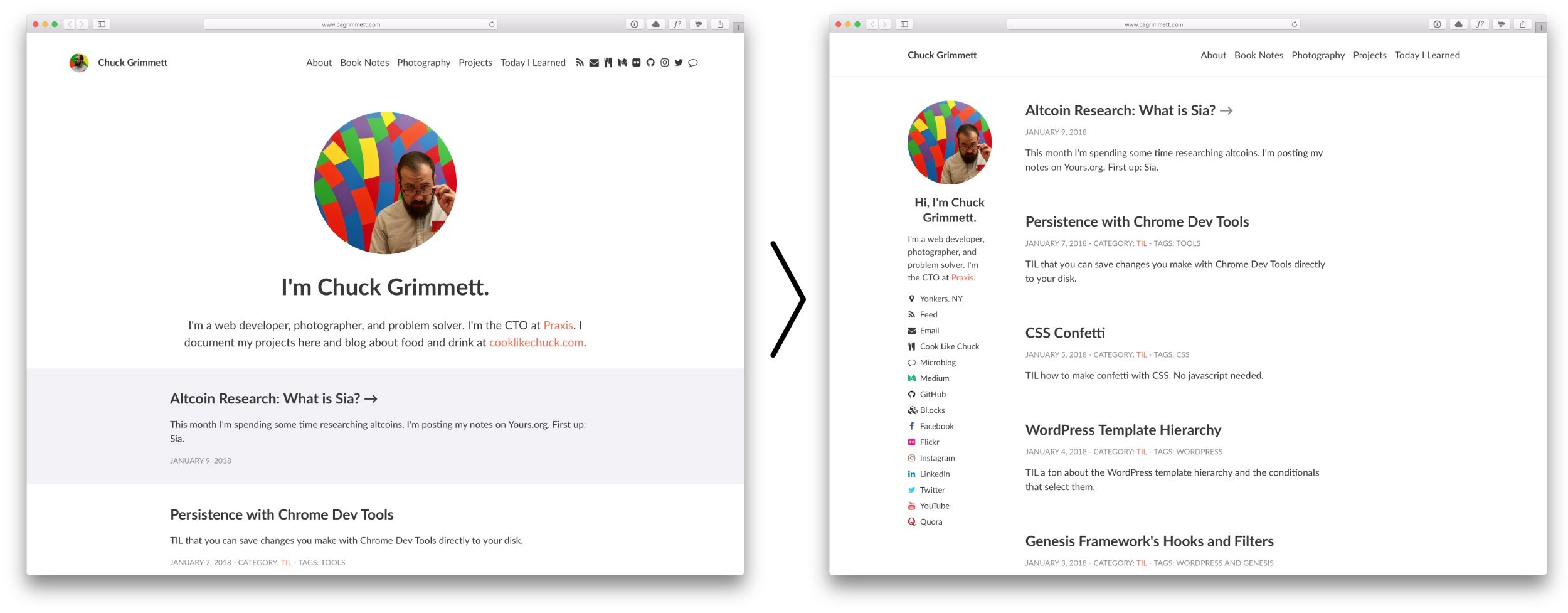
Earlier this week I did a major revamp of cagrimmett.com. It started with redesigning my page templates to include a sidebar, then it morphed into making a long-standing goal of mine reality: Reviving the posts from my old 2008-2012 WordPress blog and getting them into Jekyll.
The redesign started as a seed in my mind when I visited http://datavisualizi.ngArchived Link a few months ago. I loved the look of the sidebar with the social links. What I didnât love about it was the way the menu works and how the sidebar is sticky. I noticed the site is also built on Jekyll, so I briefly considered installing the theme, but I decided against it after about 30 seconds. I wrote most of my current theme myself and donât want to mess up my TIL and Book Notes templates. So I took an afternoon and rewrote some of my templates to include a sidebar.
The trickiest part was figuring out what I wanted to do with the sidebar on smaller screen sizes. I decided to push it up to the top on pages, show the social buttons on the Home and About pages, and then hide it altogether on posts.
The other main issue was what to do with featured images. My templates were built to include featured images on posts before, but this time I decided to make them optional. The home page and archive pages donât display featured images, but the category pages do.
Last year I started a Microblog, built a custom theme for it, and posted there 116 times over a few months.
I found it confusing to have multiple places to store content, so I decided to consolidate. Iâm keeping cooklikechuck.com separate, but Iâm killed cagrimmett.com and moved all the posts here. This was originally on WordPress, so it a small test case for whether or not it would be possible to resurrect my old 2008-2012 blog and migrate the posts to Jekyll.
There is an official jekyll-import gem that supports WordPress, so I figured that this was going to be a piece of cake. That is, until I tried to install the gem. An hour later and 5 dependencies deep down the debugging rabbit hole, I finally gave up. Cryptic error messages somewhere around the mysql2 dependency finally made me throw in the towel and go to bed.
I woke up the next morning with a renewed sense of confidence and started searching. I came across this WordPress to Jekyll exporter, which worked phenomenally well. It dumped all of my posts out as .md files with the WordPress metadata translated into YAML front matter.
I was a little worried about what to do with all of the image links, but then I realized that all uploaded images in WordPress are stored at /wp-content/uploads/year/month/filename.jpg. If I add that /wp-content/uploads/ directory to Jekyll wholesale and replace all instances of cagrimmett.com with www.cagrimmett.com, all images in posts will work! So I pulled the directory down off my server, dusted off my grep skills, and everything worked as intended. Success.
The only other hiccup was that about half of my posts on the microblog didnât have titles. That is part of the whole microblog philosophy. Those posts showed up in my main feed with just ID numbers, which looks strange. I solved that by adding hidden: true to the posts to hide them from the Jekyll paginator. Win number 2 for the old grep skills.
After my success with copying over my microblog posts, I decided to kick the difficulty up a notch and see if I could move over 500 posts from my old 2008-2012 site, which I affectionately called CAGblog. I was eager to get this stuff back online because 2008 is when I first started blogging, and I wanted my internet cred back. I know some of my stuff from when I was 18 is pretty cringeworthy, but having my old stuff up for posterity really matters to me.
Here is one of the few screenshots I have of it, from 2008:

Before I shut the blog down in 2013 and put up a landing page in its place, I made a backup and promptly forgot where I stored it. After hours of searching old hard drives, I finally found it on dropbox.com. It hadnât synced to my local machine because I had selective sync turned on. I almost panicked earlier because I thought I had lost all my old stuff. Thank goodness for Dropbox!
The first step in the revival was to restore my old database to a working WordPress site so that I could install the Jekyll exporter plugin. I only really needed the posts, not a complete working site, so I ignored all my old post templates and stuff. The database was from an early version 3 of WordPress, so I was concerned that it wouldnât work on my Homestead dev environment and Iâd have to go hunt down an old WordPress install somewhere. Thankfully WordPress has a bunch of update routines in place to handle just this kind of thing, so after going through a few âYou need to update this databaseâ prompts, I was able to log in to the wp-admin area and access all my old posts.
Just like on cagrimmett.com, the WordPress to Jekyll exporter worked exactly as intended. Now the fun began: I had a ton of old categories and tags I didnât want to use, old images I needed to find and get linked up, and old links that needed to be rewritten.
For categories and tags, I simply edited the yaml metadata on the old posts and changed the keys to oldcategories and oldtags so that Jekyll wouldnât parse them as normal. Grep win number 3.
For old images, I used the same method as on my microblog: I moved the wp-content/uploads/ folder to the root of my Jekyll site. That took care of about 50% of the broken images. The rest were scattered around other folders, so I searched for broken images, looked at where they were, and moved over every folder I could find. There are a few casualties, namely images that I didnât host myself, but the vast majority are back up and running. I was a n00b 10 years ago and just threw stuff in my main directory, so now I have a bunch of old stuff cluttering up my previously pristine main Jekyll folder. Perhaps one day I will move all that to more logical folder structure and write redirects, but for now it is all staying where it is.
The links arenât easy to preserve on a static site because I used the default post ID permalinks on my WordPress site. Those are the ones that look like website.com/?p=2347. I used the permalink key in Jekyll to set the permalink to /blog/[oldid].html. (Another win for grep. Man, regex is useful.) Then I followed this post to do some apache magic, fetch the ID from its query string, and redirect it to its new home. Now all of my old post links redirect to their new home on my Jekyll site! I clicked a few old ones from Facebook just to make sure.
When I moved to Cloudflare, my site search broke. With all of this old content back on my site, I knew I needed to get search working so the posts are findable, so I took a look at it again. The issue was that I had been submitting the form action to the same page. The query string didnât get preserved with all the redirects/rewrites Iâm doing/Cloudfront does, so I edited the submit function to just kick off the JS search function with the query directly instead of submitting/refreshing the page. Go run some searches and dig through my archives!
Today I wrote an article for the Praxis blog outlining four free charting/visualization tools and showing examples of visualizations created with those tools. One outputs SVGs, but they are a fixed size. But since SVGs are just code, I figured I could make it responsive.
First I tried the old responsive image trick: width: 100%; height: auto; – This resulted in the SVG scaling, but only the top 10% was visible.
After some Googling, I came across this article: How to Scale SVG on CSS Tricks. Here I learned about the viewbox attribute. The viewBox does many things:
My original SVG was 848px by 500px. So, I set viewbox="0 0 848 500" and width=100% and removed the height attribute.
This led to a nice scalable SVG:

This month I’m spending some time researching altcoins. I’m posting my notes on Yours.org. First up: Sia. https://www.yours.org/content/altcoin-research–what-is-sia–c72e723a56a0
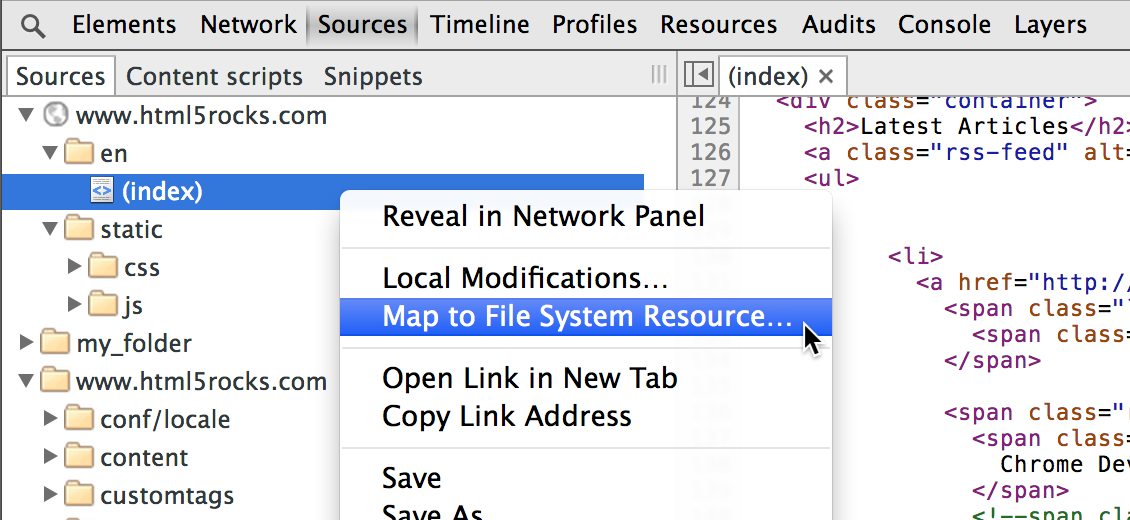
TIL that you can save changes you make with Chrome Dev Tools directly to your disk instead of having to copy and paste them out (or forgetting to and accidentally hitting refresh, which I do at least once a day.)
More info here: https://developers.google.com/web/tools/setup/setup-workflow

TIL how to make confetti with CSS. No javascript needed.
I used this codepen as a base and modified it to my needs. The author, @fionnachan, had an interesting method I hadn’t thought of: Make a div for each piece of confetti, transform and skew each one, and then set a random offset so it looks like each one moves independently when you apply keyframes animation. @for in SCSS makes the random offsets and transforms a breeze.
The only downside is that it compiles to almost 4000 lines of CSS. I’m going to try a JS version and see how it performs in comparison.
UPDATE January 7, 2018: I moved to a JS solution based on https://codepen.io/anon/pen/JMOQzE. 50 lines of code + a jQuery dependency that was already getting loaded anyway is much better than 4000 lines of CSS, even if the CSS is novel.


TIL a ton about the WordPress template hierarchy and the conditionals that select them.
Relevant resources:

TIL about the Genesis framework’s hooks and filters. I’m disappointed in how poorly they are documented. I spent most of my time digging around in the Genesis base theme’s /lib/ folder deciphering their functions and figuring out what powers what via trial and error.
Here are a few resources that helped along the way:

Derek Magillâs 100 Things That Made My Year post inspired me to write one, too. Here are my 100 highlights of 2017:

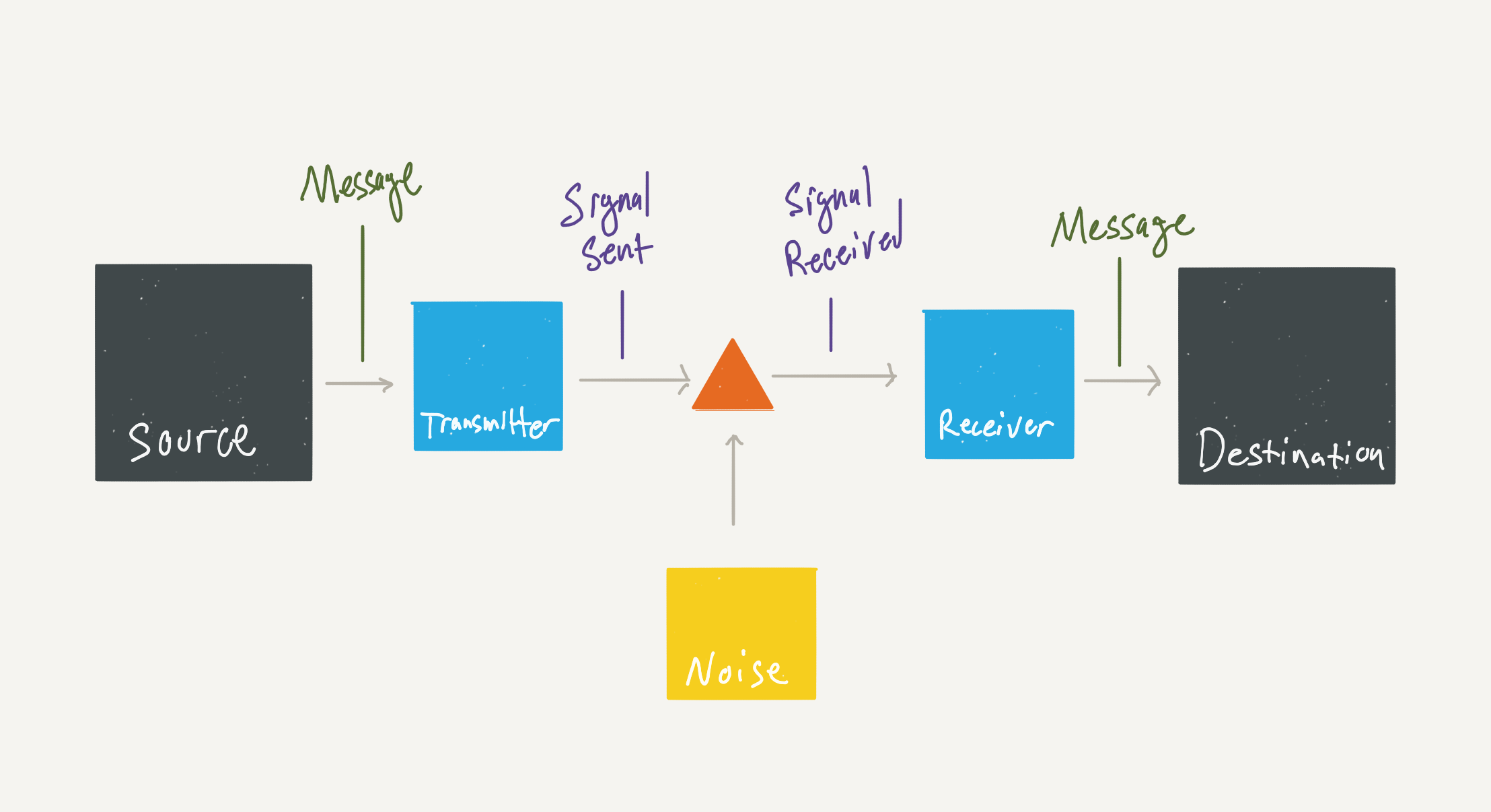
I listened to most of “A Mind at Play: How Claude Shannon Invented the Information Age” on a road trip today. I learned that all forms of communication share the same basic elements, no matter the sender or medium.
Claude Shannon, the father of information theory, published “A Mathematical Theory of Communication” in 1948, which laid out these basic elements:
Here is a diagram I drew of these elements:

All forms of communication share these same basic elements, including:

We emphasize the importance of working out loud throughout our curriculum. Each of our participants make portfolio sections on their websites where they collect projects theyâve built. How you package and present your projects matter as much as the projects themselves! Here are some general guidelines for what makes a good project write up. https://discoverpraxis.com/guidelines-putting-projects-display/Archived Link
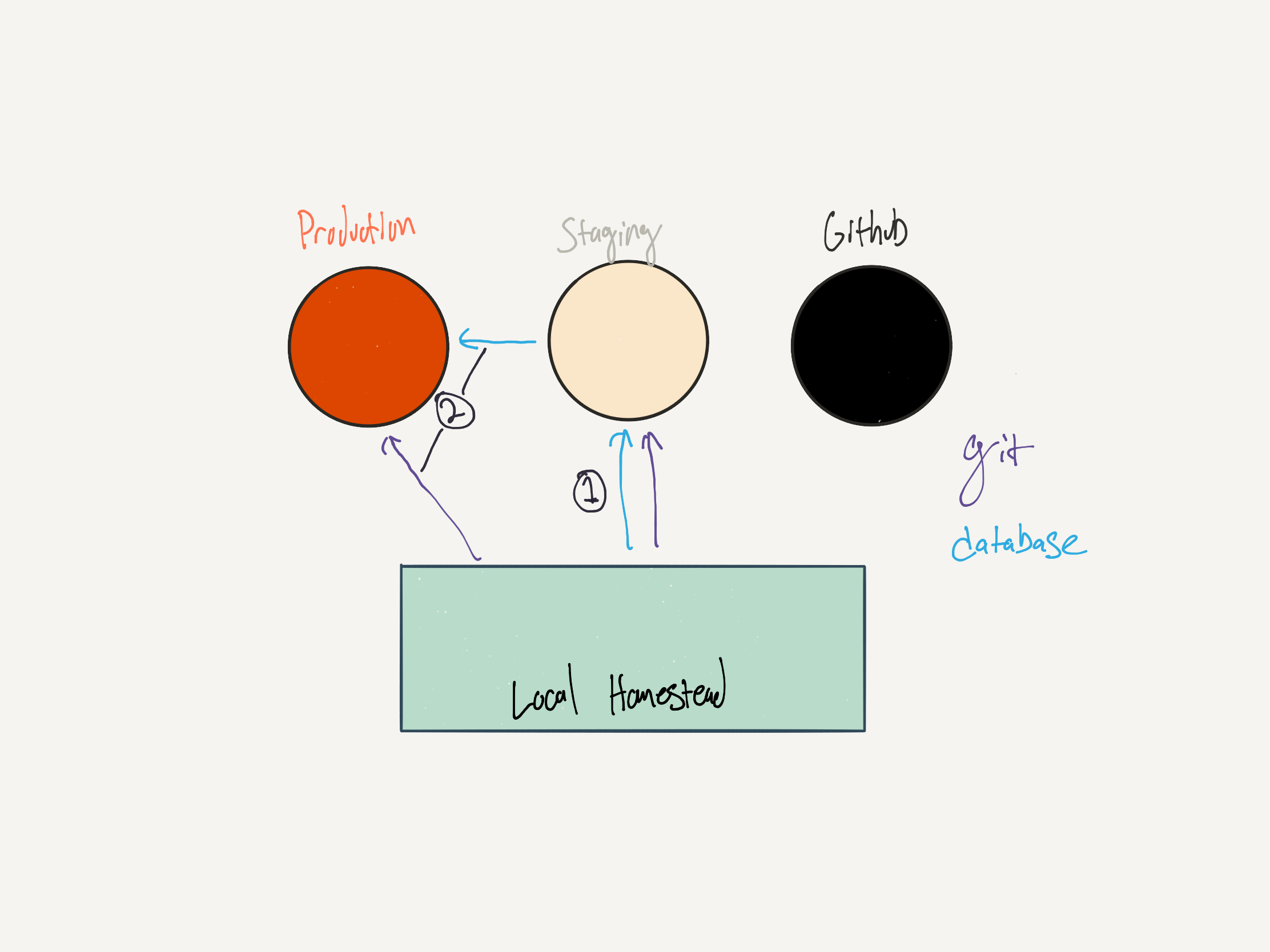
git pull.Here is my testing and deploying workflow:

git push staging master – Sends the code up to the staging server on WPengine. If I have database changes to migrate, I do so immediately afterward. For pages/posts I use the general WordPress exporter. For theme settings, both main theme frameworks I use (Genesis and Total) both have theme settings import/export features. For widgets, I use the Widget Settings Importer/Exporter plugin.git push production master. This pushes my already tested code to the production environment. No code touches production without having been tested on staging first. If database changes need to be moved over, I’ll either use WPEngine’s Deploy Site tool for big changes, or export them from Staging and import them on Production for smaller changes or times when the database on Production is significantly out of sync with staging.At the end of my work day, I back up my work:

This is a two-part process:
git push github master pushes my day’s commits up to Github.gulp dumpDatabase dumps my database from Homestead and saves it to my hard drive, which gets replicated within 30 minutes to Backblaze.
Yesterday I worked on building the new Praxis website for 12 hours straight, from 12-12, after spending the morning on coaching calls with Praxis participants. I was getting a lot of good work done, then I hit a wall with coding out this timeline:
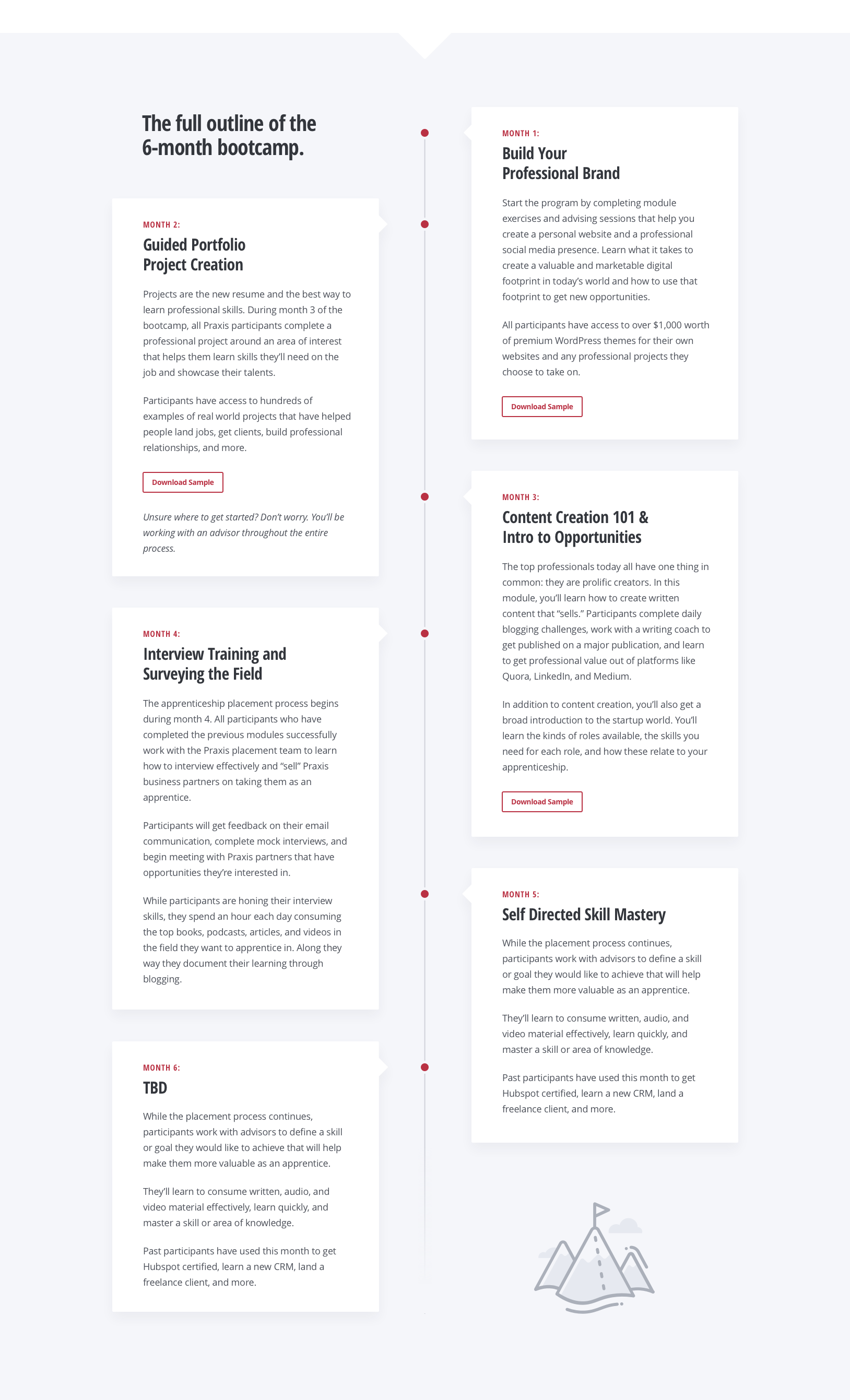
I tried a bunch of different solutions for about three hours. Nothing worked. I got frustrated and almost convinced myself that this just couldn’t be done. It was about midnight at this point. I knew how to make the month boxes offset from each other on the left and right and make the whole thing responsive OR make the month boxes overlapping like this and the whole thing static/non-responsive. But not both.
Then, thankfully, I took a step back for a brief moment. The designer we contracted to design this is well-known and a great web developer in his own right. I was pretty sure that he wouldn’t design something that he couldn’t actually build himself. So I emailed him and asked for guidance.
Within a few hours he got back to me with a rough solution. He immediately pointed out two things that alluded me:
With an hour and a half, I took the rough solution he outlined and turned it into a fully functioning polished version of the design.
This was a great reminder for me:
How do you address being fired when asked in an interview? Turn it into a growth story. https://discoverpraxis.com/turn-defeat-growth-story/Archived Link
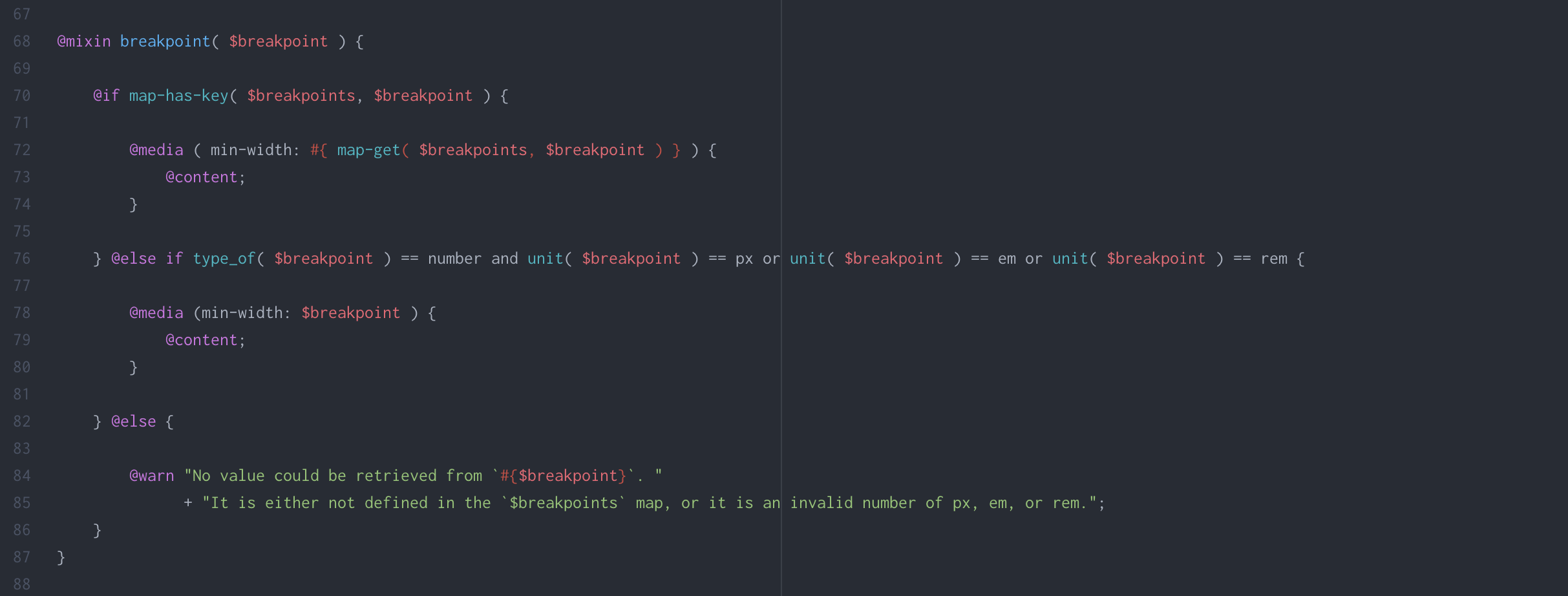
Up until last week, Sass breakpoints were a bit of a mystery to me. I finally figured out how they work.
First, they are programmatically generated. Define the breakpoints as a map. I use the list here.
$breakpoints: ( xs: 512px, sm: 768px, md: 896px, lg: 1152px, xl: 1280px );Next, use a mixin and expressions to build the media queries. I use min-width. I leave it as an exercise for the reader if you wish to reverse this to use max-width instead.
@mixin breakpoint( $breakpoint ) { @if map-has-key( $breakpoints, $breakpoint ) { @media ( min-width: #{ map-get( $breakpoints, $breakpoint ) } ) { @content; } } @else if type_of( $breakpoint ) == number and unit( $breakpoint ) == px or unit( $breakpoint ) == em or unit( $breakpoint ) == rem { @media (min-width: $breakpoint ) { @content; } } @else { @warn "No value could be retrieved from `#{$breakpoint}`. " + "It is either not defined in the `$breakpoints` map, or it is an invalid number of px, em, or rem."; } }To use, define your breakpoint styles using @import. Here is an example defining H1 font sizes at three different breakpoints:
h1 { text-transform: capitalize; @include breakpoint(xs) { font-size: 2.2em; } @include breakpoint(sm) { font-size: 2.7em; } @include breakpoint(xl) { font-size: 3em; } }
I saw this question on Reddit: I recently graduated with a degree in business management, but Iâm having a hard time finding a management job. Iâm not getting any interviews because I have no experience. What can I do? Here is my answer: https://discoverpraxis.com/10-steps-becoming-manager/Archived Link
Yesterday I threw down a challenge to the Praxis community: 12 Days of Christmas Blogging. Blog every day from the 13th until Christmas. Flex that shipping muscle in the face of holiday obligations and time constraints. Stay on that grind when it is easy to let it slip.
Iâm playing with fire here because I have to ship, too. Like all good challenges, the blade has to cut both ways in order for it to be any fun.
Here is yesterdayâs post: How can I come up with more ideas?Archived Link
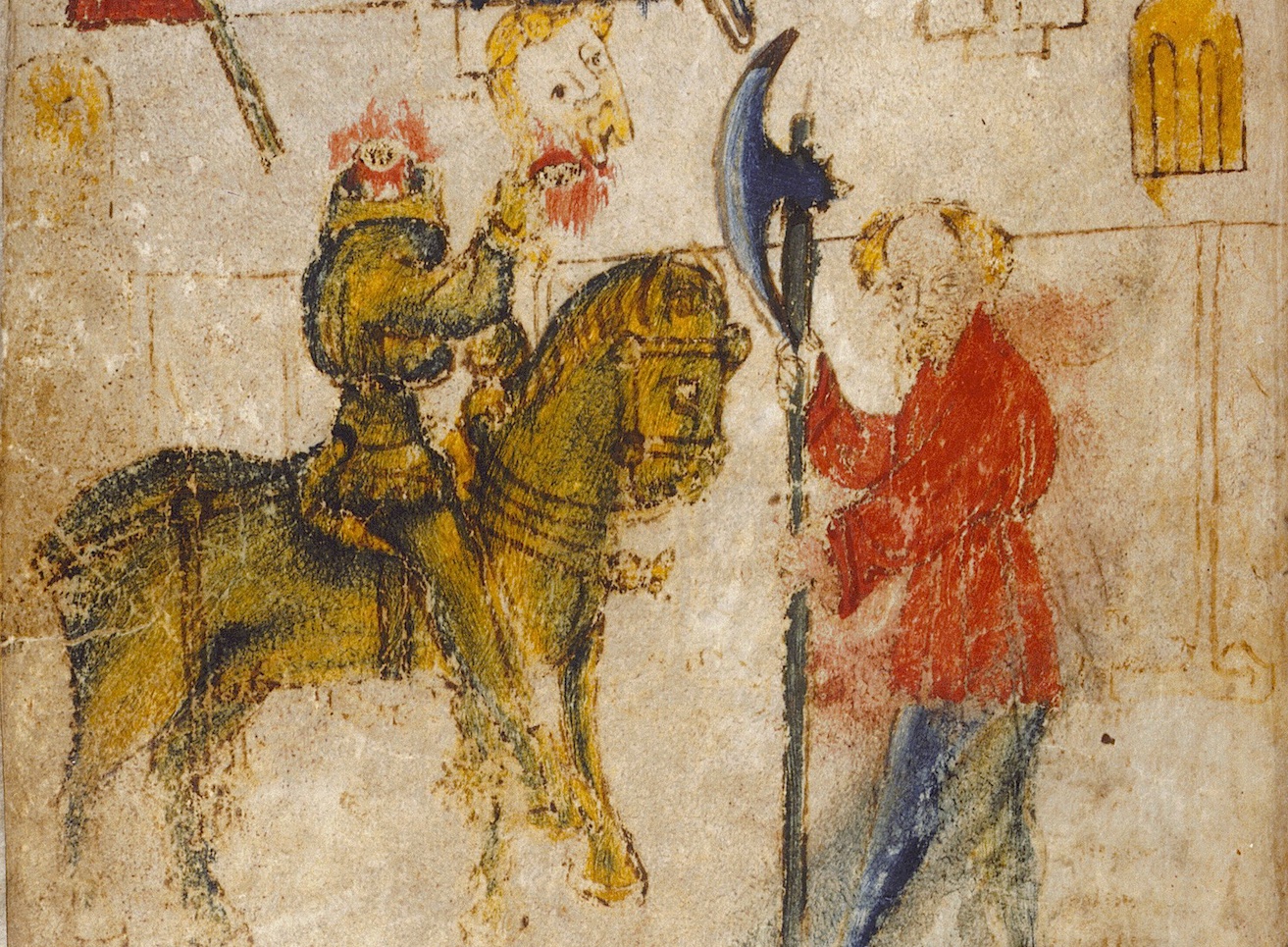
This reminds me of my favorite Christmas story: Sir Gawain and the Green Knight.

The story opens with at King Arthurâs court where he and his men are exchanging gifts and getting ready to feast. A gigantic green figure atop a green horse rides into the court with an axe and a piece of holly. He challenges the court to âa Crystemas Gomanâ – someone can strike him with his axe and he will return the stroke in a year and a day. Sir Gawain rises to the challenge and promptly lops off the knightâs head with his own axe. Not missing a beat, the knight picks his head up off of the floor, reminds Sir Gawain that they have date at the Green Chapel in a year and a day, then rides off as abruptly as he arrived.
I wonât ruin the rest for you. Give it a read this Christmas! The story teems with vivid, meaningful descriptions, double meanings, alliteration, imagery, and symmetry. It is a wonderful read.
To mark the occasion of my own Crystemas Goman, here is a translation I did of my favorite passage. I used Casey Finchâs Complete Works of the Pearl Poet for the text and the Oxford English Dictionary for reference of word meanings.
'Nay, frayst I no fyÈt, in fayth I þe telle; 279 Hit arn aboute on þis bench bot berdlez chylder. If I were hasped in armes on a heÈe stede, Here is no mon me to mach, for myÈtez so wayke. Forþy I craue in þis court a Crystemas gomen, For hit is Èol and Nwe Èer, and here ar Èep mony: If any so hardy in þis hous holdez hymseluen, Be so bolde in his blod, brayn in hys hede, Ãat dar stifly strike a strok for an oþer, I schal gif hym of my gyft þys giserne ryche, Ãis ax, þat is heué innogh, to hondele as hym lykes, And I schal bide þe fyrst bur as bare as I sitte. 290 âNay, on my word, I seek no fight; 279 There are about these benches but beardless children. If I were fastened in armor on a noble steed, There is no man here to match me, for their strength is weak. And so I ask in this court for a Christmas game, For it is Yule and the New Year, and here are many agile fellows. If any in this hall holds himself hardy enough, Be so bold in his blood, mad in his mind, That dare swiftly strike one stroke for another, And I shall give him as my gift this well-wrought guisarme, This axe, that is plenty heavy, to handle as he likes, And I shall endure the first blow as bare as I sit. 290 The old saying, âYou are what you eatâ, applies to the creative process. If you want to be creative and come up with ideas, the best thing you can do is engage the creative ideas that are already out there. Not because you want to copy or emulate them, but because creative ideas catalyze other creative ideas. https://discoverpraxis.com/more-ideas/Archived Link

The past few days have been quite a ride in the crypto world! This rollercoaster is reminiscent of late 2013, except now there is much more skin in the game. My latest piece on Yours.org covers my history with BTC, BCH, and Ripple, and my investment and use strategies for the currencies. Read this piece over at https://www.yours.org/content/my-btc–bch–and-ripple-strategies-cb2b3d401e30.

I’m not sure that we have a bitcoin-caused environmental energy crisis on our hands. This piece on Yours.org points out some of the issues with the articles going arount about bitcoin and the environment. Read this piece over at https://www.yours.org/content/does-the-environmental-case-against-bitcoin-have-merit–656fd7d75c0f.


