Blog
-
Snack Time Episode 1 – Supreme Court Nominations

-
Hiding Categories from the Jekyll Paginator, Unless, and Insert statements

Today I learned:
Hiding Categories from Paginator
According to the Jekyll docs, the
jekyll-paginatorplugin does not support categories or tags. That means there is no way to exclude a category as a whole. You can only exclude posts individually by includinghidden: truein each post’s YAML front-matter.I’m hiding all of my TIL posts from the front page of my site, so I did a global find and replace to accomplish it.
Mirror of If statement in Liquid
Liquid has a neat concept that is the inverse of an If statement. It executes if a condition is not met.
{% unless post.categories contains 'TIL' %} Code here to display all the things! {% endunless %}Inserting via
mysqli()Using the
mysqli()function I wrote about yesterday, here is how to insert something into a table:$connect = new mysqli($server, $db_username, $password, $db); $connect->query("INSERT INTO `table_name` (username) VALUES ('$user');");Make sure your variables are sanitized first! You don’t want someone doing a SQL injection.
Eric Davis told me that
mysqli()is the old way of doing things and I should check out PDO instead. -
Connecting and Writing to MySQL with PHP

Today I learned:
Connecting to MySQL with PHP
$server = "localhost"; $username = "username"; $password = "password"; $db = "dbname"; //connect $connect = new mysqli($server, $username, $password, $db); //Check Connection if ($connect->connect_error) { die("The connection failed: " . $connect->connect_error); }Check if a table exists and create it if not
This checks for a table called
scorecard_testand creates it if it doesn’t exist. The SQL parameters for the columns are:- An integer called
IDthat is the primary key and auto increments - A username that can’t be NULL
- A column called counter that has a default value of 1 if there is nothing passed, and the length can’t be longer than one digit
- A column that holds the current timestamp.
// SQL syntax $sql = "CREATE TABLE IF NOT EXISTS scorecard_test ( id int(11) NOT NULL AUTO_INCREMENT PRIMARY KEY, username varchar(255) NOT NULL, counter int(1) NOT NULL DEFAULT 1, time TIMESTAMP )"; // Connecting, sending query, showing errors, and closing connection if ($connect->query($sql) === TRUE) { echo "Done!"; } else { echo "Error: " . $connect->error; } $connect->close(); - An integer called
-
WordPress Plugins, Development Planning for New Developers

Today I learned:
Development planning for new developers
Philosophies like Agile Development are great for teams working on large projects, but for someone just getting started with development and working on small projects, they can be a little much. For situations like this, Readme Driven Development strikes the right balance of planning out your project, writing documentation, and actually doing the work.
Write your Readme first! (H/t to Eric Davis for telling me about this.)
WordPress Plugin Basics
I have a food & drink website where I post regularly. Lately I’ve been trying lots of kinds of coffee to dial in my ROK Espresso maker and I’m starting to reach the limits of how many I can accurately remember. I’ve been wanting to make a WordPress plugin for a while, so why not make a plugin that makes a Coffee Reviews custom post type? (The main goal here is to write my own plugin and learn how it is done, so please don’t suggest already made plugins that I could use.)
I’m using WordPress’s Plugin Handbook to learn the basics.
Barebones
The most basic WordPress plugin is a PHP file with a plugin header comment. Here is mine:
/* Plugin Name: Coffee Reviews */You’ll eventually want a lot more in the header. Here are the requirements.
Hooks
Hooks allow you to tap into WordPress without editing the core files. (Rule #1 is to never edit the core files.) You pass functions through hooks to extend or change WordPress functionality.
The
register_activation_hook()runs when you press “Activate” on a plugin. Since I’m making a custom post type, I’ll want to use the activation hook to refresh permalinks once the post type is created. If your plugin needs a custom database table, you can create that with a function passed to this hook.The
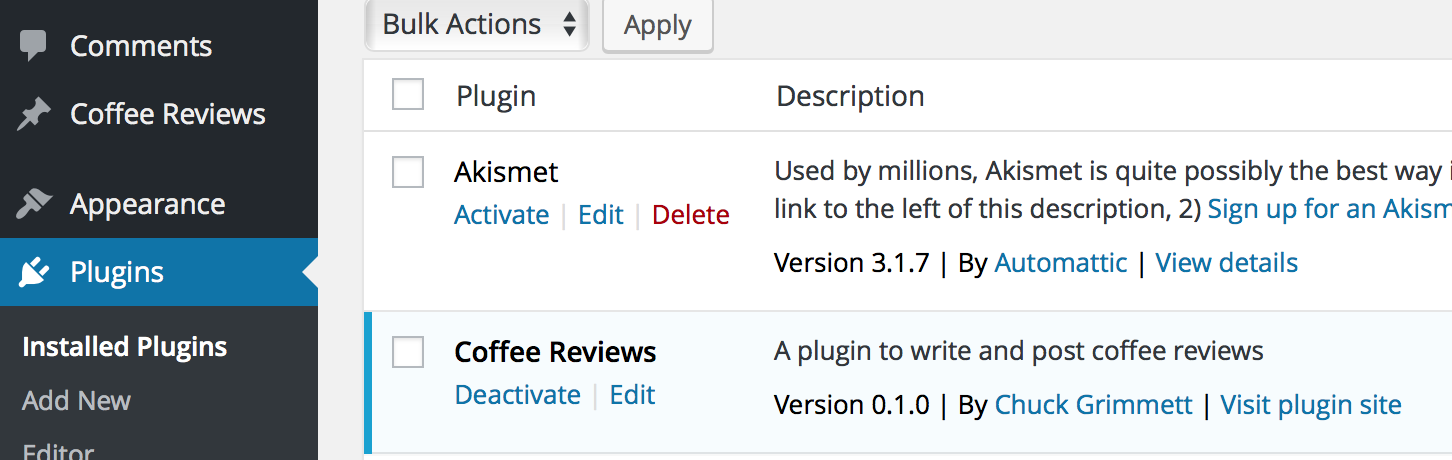
register_deactivation_hook()is basically the reverse of the activation hook. When you deactivate the plugin, the items passed to this hook fire. I’ll want to clear the permalinks again.I made a barebones plugin tonight that registers the custom post type. I definitely have more work to do, but saving, hitting refresh, and seeing this appear never gets old!

-
Easier Syntax Highlighting, Downloading WordPress.com Email Followers, and Jekyll Tools

Today I learned:
Easier syntax highlighting with Jekyll
So it turns out that there is an even easier way to do syntax highlighting in Jekyll than I described last week. Jekyll 3 has Rouge highlighting built right in.
To use it:
{% highlight liquid %} Put your foo here bar end foo {% endhighlight %}I need to go back though my previous posts and remove the Pygments highlighting then uninstall the plugin. Rouge supports fewer languages than Pygments, but Rouge supports all of the languages I use, plus Liquid and Markdown, which Pygments doesnât.
Downloading WordPress.com Email Subscribers
I learned today that it is possible to download a CSV of the email subscribers to your WordPress.com blog (or WordPress.org blog powered by WordPress.comâs JetpackArchived Link). They donât make it obvious, but the option is there:
- Go to https://wordpress.com/stats/follows/email and log in.
- Select the site you want to download your email subscribers for.
- At the bottom of the list, you should see an icon and download button:
Download all email followers as CSV
Jekyll Tools
Last night I cleaned up some of my Jekyll templates and put them on Github with instructions for how to use them. Check them out:
-
Jekyll Tools

Back in the summer of 2015, I decided to trash my website and rebuild it from scratch on top of Jekyll, a static site generator.
My goal was two-fold:
- Build a new, fresh website to house my personal brand.
- Learn the Liquid templating language.
I found a starter theme, gutted it, and spent a week digging in to how Jekyll works in order to build the features I wanted. Along the way I built out some tools and templates for myself and decided to share them on Github.
The collection so far:
- A template for adding social metadata (Open Graph and Twitter Cards) to posts and pages
- A template for adding Disqus comments
- A template for listing posts by tag
- A posts heatmap calendar
- Options for Search on a Jekyll site
- A template for filtering categories with Isotope
- A Jekyll Collection template for Book Reviews, complete with star ratings
- Moving your Jekyll Site to Amazon S3 and Cloudfront with Outside DNS
-
Infrastructure and Git Best Practices

Today I learned:
Proper development infrastructure
When doing development work, it is best if you have a separate, dedicated area for each of these things:
- Development – The area where you do your development work.
- Staging – The area where you deploy changes and thoroughly test them. The only thing that should be out of sync with the production environment is the single change you are testing.
- Production – The live system for stable, tested code.
I’ve attempted to replicate this best-practice with the development of my Toggl slash command for Slack. My development environment is on a Homestead box on my local machine. The staging area is a folder on my dev server that a
/toggldevcommand posts to. Once the changes here have been confirmed, I commit my code to the repository and then deploy it to production. The production environment is a folder on my main server that the/togglcommand posts to. This is the one my team uses and it stays up to date with releases in the repository.Of course, the entire process is better if you have version control:
A method for committing changes in Git
Eric Davis advises me that it is better form to commit changes after each feature you want to release is completed rather than commit after a full day of work. If you don’t commit after each feature (and develop each feature in a separate branch), you’ll end up with a mass of code changes in each commit that is about as tangled as spaghetti.
Right now, since I’m the only one working on my Toggl project and the changes I’m making aren’t major, I’ve only been working directly on the
masterbranch. This Atlassian tutorial on branches has convinced me that I should be using branches on a daily basis for development, so I’m going to start that this weekend with some new features I plan to work on. -
Checking for Keys and Looking Up Values in Arrays, Restricting Files in .htaccess

Today I learned:
Checking for a key in an array
key_exists($key, $array)For the Toggl Slack slash command, I’m using it to check if someone’s Toggl API key is in the array in
variables.php:if (key_exists($user_name, $toggl_api_key_mapping) == FALSE) { echo ":warning: You haven't set up your Toggl API key with this command yet. Get it at the bottom of https://toggl.com/app/profile and send it to @$your_admin_name."; }Notes:
- Case sensitive. If you need it to be insensitive, use
strtolower()on the$key - Boolean (returns TRUE or FALSE)
Looking up a key and returning a value in an array
$array['key']For the Toggl Slack slash command, I’m using it to set someone’s API key from the array in
variables.php:$toggl_api_key = $toggl_api_key_mapping[$user_name];
Blocking access to files via .htaccess
If you are serving something on your webserver that you don’t want anyone else to be able to access, you can restrict access to by adding this snippet to your site’s
.htaccessfile:log.csv> order allow,deny deny from all If you need only a certain IP address, you can achieve this by adding
allow from 0.0.0.0(replace that number with your IP address):log.csv> order allow,deny allow from 0.0.0.0 deny from all - Case sensitive. If you need it to be insensitive, use
-
Basic Logging with PHP and Syntax Highlighting in Jekyll

Today I learned:
Basic Logging to CSV in PHP
I asked Eric Davis about logging for debugging and usage stats on my Toggl Slack slash command and he suggested that I look into writing to a CSV or JSON file. I opted for CSV.
Here I build the array from the information I get back from Slack (plus a datetime stamp) and pass it to a file called
log.csvviafputcsv().$log_array = array($date,$user_id,$user_name,$command,$text,$response_url,$channel_id,$channel_name,$token,$team_id,$team_domain); $output = fopen('log.csv', 'a'); fputcsv($output, $log_array); fclose($output);A note on
fopen()– A lot of tutorials replace that'a'with a'w'. According to the docs,wwrites at the beginning of the file, which is why my first couple tries overwrote each other. Theastarts writing at the end of the file, which is always a new line sincefputcsv()always ends with a line break.
Syntax Highlighting
I finally found a good solution for syntax highlighting in code blocks with Jekyll: Kramdown with Pygments plugin.
Installation is simple: Clone the project to your
_pluginsfolder and add it to the Plugins section of your_config.yaml, then you are ready to go.Usage is equally as simple: Specify the language at the end of the first line of your code blocks and the plugin will add the proper classes and highlight the code according to the language.
Example:
~~~~ php echo "Hello world!"; ~~~~Will output:
echo "Hello world!"; -
Thoughts on Providing Solutions, Learning, Culture, and Distractions

I didn’t do much technical work today besides some front-end debugging. Instead I did a lot of administrative and project management work and ended up thinking a lot about how I work.
Here is what I thought about.
Always provide a solution
As a consultant, you aren’t paid to tell people they have problems. They already know that and chose to hire you. It is your job to provide solutions.
Instead of being negative or saying that a proposal can’t be done, try to get at the heart of the request and offer an alternative solution. You and your clients will be much happier.
As things get frustrating, it is easy to take the, “look how messed up this thing is” route. But that isn’t your job. You need to roll up your sleeves, brew some coffee, and come up with a solution.
Learning
I find time and time again that I retain so much more of what I learn if I’m applying it as I’m learning. So why do I continue to use books with pre-designed activities that I mindlessly copy? Because it is a lot easier than coming up with a project from scratch.
From now on I’m applying what I learn in my own way. No more copying examples. I’m going to figure it out and learn it the hard way.
Culture
- Sometimes you need to find software that is a better fit for your culture. But sometimes you need to take a hard look at the culture and its ability to adapt if there doesn’t seem to be any good solution.
- Like learning, sometimes cultural change only comes the hard way: Adapting because it is necessary.
Distractions
- Second screens are great for productivity when you are in the zone. Unfortunately they are also great for procrastination when you aren’t in the zone. Sometimes you need to turn that second screen off and focus on one thing at a time.
- Filter, filter, filter. Reduce the number of things that can distract you. If you don’t need to make a decision on it, don’t let yourself see it. For example, in Excel, if you only need to read items that have a specific attribute, filter your view by that specific attribute and hide the rest.
Idea for a Slack bot: What is distracting you right now?
- Regular messages (10, 2, and 4?) via Slack
- Respond with comma separated items that are distracting me.
- Save those responses in a database for later analysis
-
Toggl Slash Command for Slack

Today I released my first personal project on Github: Toggl Slash Command for Slack.
It is a custom slash command that enables users to put time entries into Toggl from Slack.
I like to learn by giving myself projects. I treat them as if I were releasing them to the public, even if I’m going to move on after I’ve learned what I want to learn. This is one of those projects. I created a roadmap of features that I probably won’t ever implement, but I learned a ton getting what I have so far to work, so I’m calling this a win.
What I learned
- How to read from and write to an API
- How to structure complex if/then statements to parse input text
- Dealing with arrays in PHP
- Deeper regex processing
- Unicode conversions
- Releasing code to a public repo on Github
- Designing security measures for a system deployed on the web
- How to structure and design a codebase from scratch
- How to work within the bounds of the different systems you are working in and finding ways around barriers
- Implementing command line options
- Using other projects in your own project via dependency managers like Composer
- Writing documentation
Features
- Show a list of projects and their corresponding IDs in a given workspace
- Show a list of tasks associated with a given project
- Add time entries to Toggl straight from Slack’s message input box
Screenshots


Setup & Installation
Dependencies
- You must have PHP 5.3.2+ installed locally and on an accessible server.
- You need Composer installed locally to install the third-party dependencies.
Two third-party libraries are dependencies included via Composer:
- guzzle-toggl by arendjantetteroo
- GetOptionKit by c9s
Local Installation
- Clone or download this repository onto your local machine
- Install Composer in this repository if you don’t already have it
- Open a command line terminal and navigate to this directory.
- Run:
php composer.phar installvia the command line to install the third-party dependencies
Configure the variables file.
- Copy the variables-dist.php file to
variables.php - Fill out the Slack token you got while setting up the slash command.
- Fill out users’ Slack usernames with their corresponding Toggl API keys in the array. They can get those keys at the bottom of https://toggl.com/app/profile.
- Enter a workspace ID for your team. to find yours, log in to Toggl, then go to https://www.toggl.com/api/v8/workspaces. Pick the ID of the workspace you want to use. Don’t wrap it in quotes; it needs to be an integer.
- Set your team’s default timezone. Right now it is set to
america/new_york. - Save the file as
variables.phpin the same directory and you are good to go!
Upload to a server with a valid SSL certificate
- Once the dependencies are installed, upload the whole directory to a server running PHP 5.3.2+
- Ensure you have a valid SSL certificate. Slash command URLs must support HTTPS and serve a valid SSL certificate. Self-signed certificates are not allowed. Check out CloudFlare for an easy way to obtain a valid certificate.
Configure a custom slash command on Slack
- Log in to your Slack account and navigate to Custom Integration to set up a custom slash command.
- Click Add Configuration.
- Choose the command you want (I use
/toggl). - Fill out the path to the
slash_parsing.phpfile on your server from above. - Set the method to be POST.
- Copy the token and save it for
variables.phpbelow. - Set a fun name and icon. I use Toggl’s logo from their media kit.
Usage
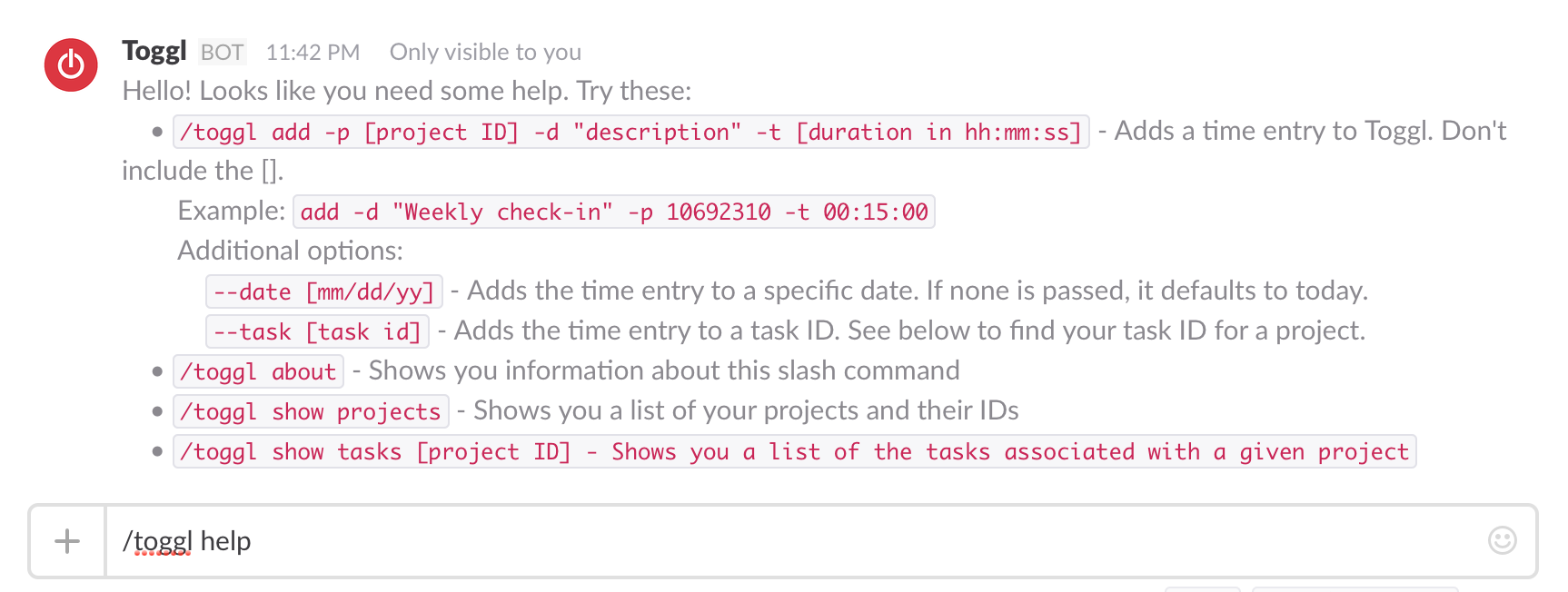
/toggl help– Shows the syntax below/toggl about– Shows info about this slash command and directs people to this repository/toggl show projects– Shows the list of projects associated with API key of the user the workspace ID set invariables.php/toggl show tasks [project ID]– Shows a list of tasks associates with a given project ID.- Example:
/toggl show tasks 10692310
- Example:
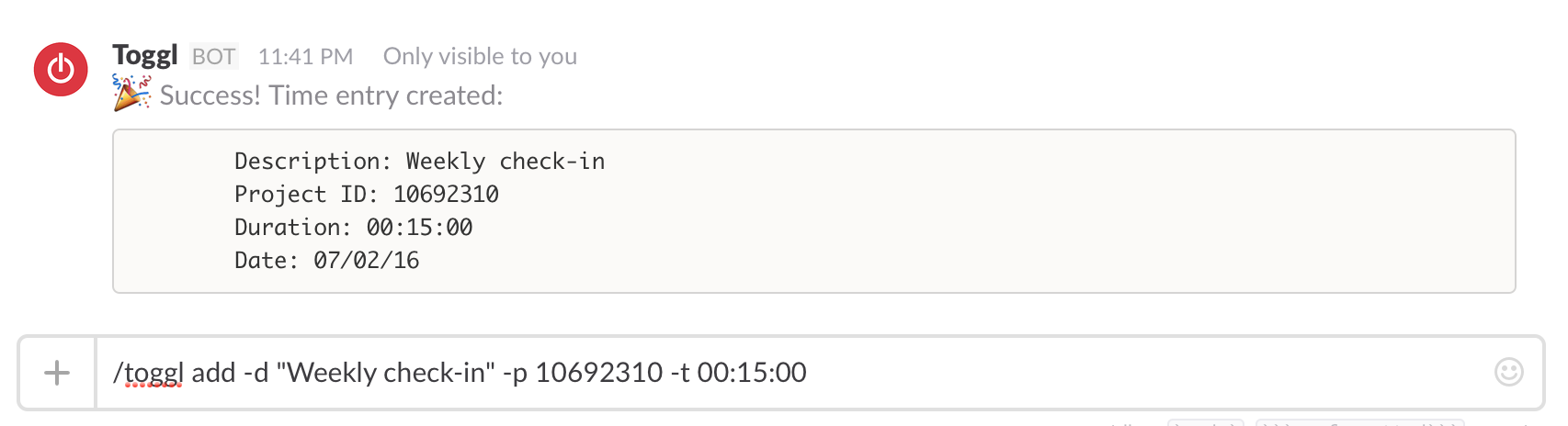
/toggl add -p [project ID] -d "description" -t [duration in hh:mm:ss]– Adds a time entry to Toggl. Don’t include the [ ].- Example:
add -d "Weekly check-in" -p 10692310 -t 00:15:00 - Additional options:
--date [mm/dd/yy]– Adds the time entry to a specific date. If none is passed, it defaults to today’s date.--task [task id]– Adds the time entry to a task ID. See above to find your task ID for a project.
- Example:
Logging
- I added basic logging to CSV for usage stats and debugging. This happens individually per project, stored in
log.csv. Nothing is transmitted back to me. - If you’d prefer to not log usage, simply comment out lines 14-19 in
slash_parsing.php. - Since the log includes a Slack token, you’ll want to deny access to
log.csvon your webserver. I achieved that via my.htaccessfile.
-
Unicode Conversions in PHP and Remote Git Repos

Today I learned:
Converting Unicode quotation marks in PHP
Unicode quotation marks (sometimes called smart quotes) are those curved/slanted single and double quotation marks:
“ ” ‘ ’. The ASCII ones look like this:" '. They are usually interchangeable in word processing, but the stylized ones sometimes cause issues on the web (in a parser, for example).To convert one to the other in PHP, use
iconv():$output = iconv('UTF-8', 'ASCII//TRANSLIT', $input);If you use OS X and want to turn off smart quotes, go to System Preferences > Keyboard > Text and uncheck “Use smart quotes and dashes.”
Remote git repositories
Using git locally is one thing, but it is far more powerful (and exciting!) to push that code to a remote repository like Github for display and collaboration.
Assuming you have a local repository that wasn’t cloned from a remote one, you’ll need to hook it up to a remote repository:
$ git remote add originIf there is code already on the remote repository, you’ll need to merge it in to your local:
$ git pull $ git merge origin/masterThen push your committed files to the remote repository:
$ git push origin masterFor a great beginner’s guide to git, check out Roger Dudler’s git – the simple guide.
Toggl Slash Command for Slack
Today I released my first personal project on Github: Toggl Slash Command for Slack.
It is a custom slash command that enables users to put time entries into Toggl from Slack.
If you use it, I’d love to know! It is in its rough early stages, but I have some future additions planned for it, so stay tuned.
-
CSS Inheritance, Datetime Conversions in PHP

Today I learned:
CSS Inheritance
- In CSS some styles are automatically inherited from their ancestors (i.e. elements which contain that element). For example, if you set
body {color: red;}, all text inside the body element, regardless of what other elements the text is in, will be red unless thecolorstyle is set on one of those other elements later in the.cssfile. - This simultaneously makes writing CSS a breeze and debugging it a bit of a headache. There isn’t a great way to tell if a style is inheritable without looking at the docs.
- If you encounter an issue where your style isn’t displaying as it should and it is not responding to changes, check the docs to see if the style can be automatically inherited. If so, check the ancestors of the element you are working on.
The issue I ran into today was that my
snippets kept wrapping no matter what
overflowandwidthwere set to. It turns out thatword-wrapis automatically inherited and I had it set on an ancestor element.
Date/time conversions in PHP
Date conversions are tricky. Thankfully, PHP has some built-in functions to make this easier.
time()returns the current Unix timestamp (see below)date()converts either the current time or a given timestamp into a specified format.strtotime()converts just about any English text date/time description into a Unix timestamp (see below)
Example:
date("c", time())will take the current time (provided as a Unix timestamp) and convert it to ISO 8601 format.Unix timestamps are the number of seconds that have elapsed since the Unix Epoch (00:00:00 Coordinated Universal Time (UTC), Thursday, 1 January 1970). They can be frustrating at first because they are so foreign looking, but they are really useful because:
- They are not subject to timezones.
- Since they are simply seconds, time math with Unix timestamps is pretty simple: Convert the time you wand to add or subtract into seconds and do the direct calculation. Then if you want to get it back into a recognizable format, use one of the functions above.
I’ve been working on a custom Slack command to input time into Toggl, so I’ve been doing quite a bit with time conversions to get everything right.
- In CSS some styles are automatically inherited from their ancestors (i.e. elements which contain that element). For example, if you set
-
Doing the Work, Flipping the Status Quo, and Alphabetizing in Liquid

Today I learned:
Doing the Work
I used to be really interested in how people worked. When they get up, what their morning rituals are, what tools they use, how they use them, etc. While these things are interesting and tell a story about a person, they miss the point.
How someone works isn’t nearly as important as the fact that they are doing the work. They made the choice to do what it takes each day to practice their craft. The rest is minutiae.
If using the GTD method or having morning rituals works for you, great. But don’t think that those things are what really matter. If you’ve committed yourself to doing the work, you’ll find a way. If you haven’t committed yourself, none of the rituals or methods will make a difference.
This commitment is very difficult, but necessary.
Flipping the Status Quo
We all suffer from status quo bias. How do we overcome it? We can get 80% of the way there by:
- Instead of asking, “Why should this be different?” ask “Why should this stay the same?” – This is especially powerful when confronting clutter. (By the way, the answer, “because it gives me joy” is a valid reason for keeping something. Change for change’s sake isn’t helpful.)
- Recognize the difference between acknowledging a feeling and rationalizing that feeling to keep the status quo.
Source: Planet Money episode #683
Sorting tags alphabetically in Liquid
It was starting to annoy me that my tags were not in alphabetical order on my Today I learned page. So I learned how to sort them alphabetically with Liquid and I added anchor links with counts for each tag.
Here is my updated template code:
1 2 3 4 5 6 7 8 9 10 11 12 13 14 15 16 17 18 19 20 21 22 23 24 25
{% assign sorted_tags = (site.tags | sort:0) %}
- {% for tag in sorted_tags %} {% assign t = tag | first %} {% assign posts = tag | last %}
- {{ t | downcase }}">{{ t }} ({{ posts.size }}) {% endfor %}
{{ t | downcase }}">{{ t }}
- {% for post in posts %} {% if post.tags contains t %}
- {{ post.date | date: '%d %b %y' }}: {{ post.url }}">{{ post.title }} {% endif %} {% endfor %}
Sources: I cobbled this together from Michael Lanyon’s blog, Joe Kampschmidt’s blog, and the Liquid docs.
-
How to keep track of files and requests in Slack

Today I learned:
How to keep track of files and requests in Slack
Slack is wonderful for collaborating with remote teams, but if there is a lot of activity at once, it can be easy to lose files and requests.
- If IâÂÂve seen the request or file, I acknowledge by marking it with , then I put it on my to-do list of choice, WunderlistArchived Link. (They have a great Slack commandArchived Link to make this easy:
/wunderlist add) - If IâÂÂve fulfilled the request or processed the file, I mark it with
- If the request/file is no longer needed or IâÂÂve tried to process it, encountered an error, and notified the appropriate parties, I mark it with so that I know in the future that there was an issue with it instead of assuming it was done and I moved on.
- Using SlackâÂÂs great search functionality, I can easily visually figure out what IâÂÂve processed and what is still outstanding.
- If I get a request when IâÂÂm in the middle of something else, I copy the link and use SlackâÂÂs
/remindcommand to remind me about it later in the day.
- If IâÂÂve seen the request or file, I acknowledge by marking it with , then I put it on my to-do list of choice, WunderlistArchived Link. (They have a great Slack commandArchived Link to make this easy:
-
Useful Analytics, Scalability, and RSI

Today I learned:
Useful Analytics
- There are a lot of things that are easy to track that are completely useless to track.
- Make sure the things you track relate directly to your goals.
- Sometimes the things you want to track aren’t easy (or possible) to track and you need proxies instead. This is okay.
Visible statistics like Facebook likes and Twitter followers, etc, are easy to obsess over because they are public and they are so easy to find. But don’t fall into to the trap of thinking these numbers are what really matter. Getting more followers is unlikely to be your actual goal. Purchases, downloads, or donations and what directly affects those things are what you should really focus on. The closer the things you test are to your actual goals the better.
- Instead of Twitter followers, test and track your click-through rate for specific types of content at different times of day.
- Instead of website pageviews, track the length of time on page and how far people scroll down through your content.
- Instead of likes on a Facebook status track how many people see that status and follow your calls to action.
Scalability
You can always scale with more people or by working more hours. The trick is to design your business to scale the amount of products and services you provide without a 1:1 (or worse) increase in costs, labor or otherwise. In order to scale you want to become more efficient and more automated. When building your product/service, bake in efficiency and automation from the beginning so you can eventually move on to the next thing (or next version) while it sustains itself.
RSI
I’ve been experiencing some RSI lately in my right wrist, just below my thumb. It primarily hits when I use my mouse for an extended period. I read a number of sources and asked some friends today about how to cope with it. Here are some solutions:
- Stretching and regularly stopping to do so during the day
- An ergonomic mouse like the Anker Vertical or the Logitech MX Master
- Varying input devices, such as switching between a trackpad and a mouse or a Wacom tablet and a mouse
- Switching to a trackpad (like the Magic Trackpad 2) to minimize wrist movements.
I decided to buy a Magic Trackpad 2 and try it. The reason I went with that over a tablet or ergonomic mouse is that I can’t stand the idea of using my computer without gestures. I’d have to change all of my workflows. If the trackpad doesn’t help, I can return it within 14 days for a full refund and try one of the other mice. The past hour of use has been promising. We’ll see.
-
Meteor Basics, Secure Hash Algorithms, and 404 Error Pages

Today I learned:
Meteor Basics
- Meteor is a platform for building real-time web apps that sits between your appâÃÂÃÂs database and its user interface and makes sure both are kept in-sync. It is built on Node.js, so it uses javascript on both the client and the server.
- If you want to go above and beyond the Meteor documentation, the Discover Meteor bookArchived Link is a good place to start.
- If you want to start learning Meteor but are fuzzy on the basics of Javascript, here is an 80/20 primerArchived Link.
Basic Usage
- To create a new project:
$ meteor create [project name]- To then run that new app at
http://localhost:3000/:
$ cd [project directory] $ meteor- To stop the app from running, press
ctrl+c - Adding a package like Twitter Bootstrap to a Meteor app is incredibly simple. No files to link up, Meteor takes care of all of that out of the box:
$ meteor add twbs:bootstrapStructure
Meteor has five types of packages. most can be seen in
[project directory]/.meteor/packages:meteor-baseis MeteorâÃÂÃÂs set of core components.- First-party packages that come bundled with Meteor that can be removed, such as
mongo(the database) andsession(a client-side reactive dictionary). - Local packages specific to your app, which are stored in
/packages - Third-party packages available at MeteorâÃÂÃÂs online package repo, AtmosphereArchived Link. These are named in the
author:packageconvention. - NPM packages in Node.js. They arenâÃÂÃÂt listed with other Meteor packages, but can be imported and used by other Meteor packages.
Meteor has some special directories:
/.meteor/is where Meteor stoes its own code. DonâÃÂÃÂt modify it.- Code in
/serveronly runs on the server - Code in
/clientonly runs on the client - Everything else runs in both places
- Static assets should be stored in
/public(The exception is CSS. Meteor automatically loads and minifies CSS, so it should be stored in/client)
Meteor loads files in a specific order:
- Before anything: Files in
/lib - After everything else: Any files named
main.* - Everything else is loaded in alphabetical order by file name.
Deployment
- To quickly set up a staging server, you can create a Meteor account and deploy to a Meteor subdomain for free:
$ meteor deploy yourappname.meteor.com- For deploying to your own server, check out Meteor Up, a command line utility that automates setup and deployment for you.
404 Error Pages
- Making a 404 error page isnâÃÂÃÂt enough, you have to tell Apache where to find it. IâÃÂÃÂm used to working on WordPress, which takes care of that automatically. Turns out IâÃÂÃÂve been running this site for a few months without my 404 page working. Whoops!
- To do so, add
ErrorDocument 404 /404.htmlto your.htaccessfile. Replace/404.htmlwith the path to your 404 page.
Secure Hash Algorithms
What are they and what is the difference between SHA1 and SHA2?
- SHA stands for Secure Hash Algorithm. The short story about how is works is that a mathematical operation is run on a given input and a unique output, or hash, is generated. By comparing the output to an expected output, you can verify the dataâÃÂÃÂs integrity. The theory is that no two different input values should result in the same hash output (called a collision).
- SHA1 algorithms produce a 160-bit hash value, while SHA2 algorithms can produce 224, 256, 384 or 512 bit hash values depending on the function used.
- The very short explanation is that SHA2 hashes larger and are theoretically much less likely to have a collision than SHA1 hashes due to the underlying algorithmic changes.
What is it used for?
- Generally, SHA is used for verification. If the hash you calculate matches the expected result, your data has most likely not been tampered with or corrupted.
- Git uses SHA1 to verify data has not changed due to accidental corruption.
- SHA is used to sign SSL certificates.
- Bitcoin uses SHA2 to verify transactions
- SHA2 is used in the DKIM message signing standard (i.e. what checks to make sure someone isnâÃÂÃÂt spoofing your email account)
- Some software vendors are adopting SHA2 for password hashing.
Why should I care?
- SHA1 is on its way out. Chrome is showing errors on sites with SHA1 SSL certificates that expire past Jan 1, 2016. All major browsers will stop accepting SHA1 SSL certificates by 2017.
- Every site using SSL signed with SHA1 needs to update their certificates.
- Most certificate authorities have instructions for migrating to SHA2.
-
Readable Code Snippets, VPN Clients, and Privacy

Today I learned:
Making code snippets prettier
- I did some research for Sean Nelson about making code snippets prettier without using Githubâs Gist.
- This problem is already solved. Googleâs Code Prettify is javascript that works parses your code pretty well and colors it.
- Put the
prettyprintclass on yourtags and put this script in your document:
"https://cdn.rawgit.com/google/code-prettify/master/loader/run_prettify.js">- I might start using this for my code snippets in the future. Right now I have some CSS styles that conflict with it, so I need to sort those out first.
VPN Connection issues
- I had VPN connection issues today. The solution was to stop using the IPSec client and start using the AnyConnect client.
- Here are the differences between the two clients. (Via Eclipse, Inc)Archived Link
Privacy Policies
Iâve been having a lot of discussions about privacy and data collection recently, both at work and with friends. This episode of Whatâs the Point on privacy with Kashmir Hill cleared up some common misconceptions. The main points:
- If a companyâs fundamental business model is collecting data and figuring out things about you (i.e. Google and Facebook), they arenât selling your data, but rather selling access to your attention to advertisers. They donât want to give up your data to other people because it is such a valuable resource to them.
- Some companies who sell you physical products have a side-business selling data on what you bought and when to others.
- Privacy has become a genuine concern for companies recently, as evidenced by the rise in end-to-end encryption in consumer products like iMessage. This is worrying to some government agencies.
- If you read privacy policies, they actually tell you all the ways a company is going to violate your privacy. As long as a company doesnât do anything they didnât say they were going to do, they are protected.
-
Photoshop Patterns, Homestead Provisioning, Composer Basics

Today I learned:
Tiling Photoshop Patterns
I’ve been making some patterns for the header images on these TIL posts in my down time the past few days. There are two ways to tile patterns in Photoshop. One is manual and time consuming, the other is fast, easy, and less prone to error.
- The manual, time consuming way is to open a pattern in one layer, duplicate the layer multiple times, and move the layers so that they line up in a tiling pattern. While PS is pretty great at snapping items to a grid, sometimes they don’t always line up and you only find out after you export the image.
- The fast and easy way is to open the pattern in PS, go to Edit > Define Pattern…, then use the Pattern Stamp Tool to paint the pattern you just created across a large canvas.
This would have saved me a lot of time on the first nine headers, but c’est la vie. This will definitely save me time going forward.
Homestead Provisioning
I use Laravel Homestead for my local PHP environment. Provisioning a new site is something I’ve done multiple times, but I do it so infrequently that I have to look it up each time. So here are my quick notes:
- Create the site folder in
~/Projects/ - Map the folder and domain in
~/.homestead/Homestead.yaml - Map the domain to
192.168.10.10in/etc/hosts/(reminder:$ sudo nano /etc/hosts/) - Run
$ cd ~/Homestead - Run
$ vagrant up --provisionor$ vagrant reload --provisionif vagrant is already running. - Site should now be accessible locally.
If you need a new database for this site and load it from a SQL dump:
$ vagrant ssh $ mysql -u homestead -p -e 'create database DBNAME;' $ mysql -u homestead -p DBNAME < path/to/file.sql
Composer Basics
Composer is a dependency manager for PHP. I’ve used Composer, but like Homestead provisioning above, I’m a little rusty. Writing it down helps me remember.
After you’ve installed it (I have it installed globally), the basic usage is:
- Set up
composer.jsonin the directory you are working on. A basic structure looks something like this:
{ "require": { "ajt/guzzle-toggl": "^0.10.0", "corneltek/getoptionkit": "~2" } }- In that directory, run
$ composer installto install the dependencies listed incomposer.json. They will be in a file calledvendor.
-
Automating Drudgery, Project Planning, Parent Selectors, and Find and Replace

Today I learned:
Automating the tedious parts of these TIL posts
When writing these TIL posts, I want to eliminate as much resistance as possible so I can get straight to writing. The more steps I have to take, the less likely I am to follow through. So I took some time today to automate the one of the tedious parts: Setting up the markdown file I write these posts in with most of the specs already filled out.
I created 3 TextExpander snippets to help with this process:
- One with today’s date string and extension separated by dashes for the file name:
%Y-%m-%d-.md(I tried a fill-in for the title, but the filename doesn’t stay selected in Coda when another window launches) - One with Javascript randomly picking one of the 7 default header images I use (this is used in the next snippet):
var random = Math.floor(Math.random() * 7) + 1; TextExpander.appendOutput(random + ".jpg");- And one for generating the YAML front matter and first lines for each post:
--- layout: post title: author: Chuck Grimmett date: %Y-%m-%d category: TIL feature-img: "/img/defaults/%snippet:;random-img%" tags: - excerpt: ---
Better Project Planning
Besides for the normal scope, budget, platform, dependencies, timeline, and underlying technologies, here are a few things you need to consider when architecting and planning out a software development project:
- After delivery, what resources will we have available to maintain the system and handle emergencies?
- What impact will maintenance and support have on our ability to sell and develop new projects in the future?
- What is the opportunity cost of using one developer over another?
Parent Selectors in CSS
There are no parent selectors in CSS.
There are two ways around this:
- Use the jQuery
parents()selector to return the appropriate parent element, then use thecss()method to set the style you want. For example,("a i").parents("li").css({"margin-right": "5px"});finds list items who are the ancestors of icons wrapped in links and makes their right margin 5px. - Change the structure of your code and add specific classes that you can apply your desired styles to. For example, instead of applying a right margin to all list items and then a different right margin (via parent selector) for all list items that contain icons, make two classes with the proper margins and apply one to the plain list items and the other to list items that contain icons.
I opted for #2. It makes your CSS cleaner, keeps you from having to load new dependencies like jQuery, and keeps the styles in one place so you don’t have to search 6 months from now for where that extra margin is coming from. I’d only use the first option in cases where you have complex rules that can’t be accomplished by restructuring your code and/or adding classes to make your desired change possible.
Project-wide Find and Replace in Coda
I do the vast majority of my code-writing in Coda. I used to have to open up TextWrangler to do find and replace across multiple files, but apparently Panic added this feature into Coda sometime between v1 and v2.5. I got used to having to switch and didn’t look for it again until today.
It is buried in the sidebar under “Find In” instead of in the regular find and replace bar, so I never saw it. You can search across open files, the entire site, or in a specific directory on your local machine.

- One with today’s date string and extension separated by dashes for the file name:
-
Jekyll Upgrades and Liquid Templates

Today I learned:
Upgrading Jekyll from 2.x to 3.x
- The upgrade itself is simple: In Terminal, run
gem update jekyll. Usesudoif you run into permissions issues like I did. - If you use pagination in any of your templates, you’ll now have to add
gems: [jekyll-paginate]to the# Pluginssection of your_config.yamlor else your site won’t compile. This wasn’t necessary in 2.x.
Making an index for my TIL posts in Liquid
I wanted to have an index for my TIL posts that was organized in two ways: reverse chronologically and by tag. Here is how I’m handling that with Liquid:
### Recent TIL Posts- {% for post in site.categories['TIL'] %}
- {{ post.date | date: '%d %b %y' }}: {{ post.url }}">{{ post.title }} {% endfor %}
- {% for post in posts %} {% if post.tags contains t %}
- {{ post.date | date: '%d %b %y' }}: {{ post.url }}">{{ post.title }} {% endif %} {% endfor %}
Notes:
- The general structure of the tags method comes from Joe Kampschmidt. I started searching when it didn’t work the same way as the categories method I wrote earlier.
- This method for displaying tags works because I’m only tagging my TIL posts. Everything else goes into categories. If I were to tag other kinds of posts, I’d need to first limit by posts in
site.categories['TIL'] - Category names are case sensitive.
- You can display raw Liquid markup without it rendering by wrapping it in {%raw%} and {%endraw%}.
- The upgrade itself is simple: In Terminal, run
-
Pull requests, scraping Reddit, and flexbox quirks

Today I learned:
How to contribute to an open-source project on Github
- Fork a project
- Make the changes, commit, and push back up to Github.
- Go to the repo on Github you want to propose a change to.
- On the page: Choose your branch. Compare and review. Create pull request.
Pulling Reddit data with Python
- Connect to Reddit and grab data with PRAW
- Store the retreived information in a MySQL database with PyMySQL
The above two items came together in one learning experience. I helped Seth Millerd debug a Python script he was working on (with considerable help from Eric Davis!Archived Link). It is the first public repo Iâve contributed to, and the first time Iâve made a pull request. We use git at work, but we use a shared repo model instead of the fork & pull model.
Image scaling quirks with flexbox
Eric DavisArchived Link and I ran into a strange CSS issue where an image was scaling in a funky way when we resized the browser. The height was staying fixed while the width was changing, but there was nothing in the CSS setting a specific height.
It turns out that one of the parent
s haddisplay: flex; flex-direction: column;specified for layout order purposes, and when we turned that off the problem went away. So then we went searching and the quick-and-dirty fix is wrapping the image in a vanilla. That is working for us for now, but I want to read through the W3 docs and see if there is something bigger we are missing or if this is a known bug. -
Five Minute Journal TextExpander Snippets

A few days ago I listened to Tim Ferriss’s show on The Magic of Mindfulness and learned about the Five Minute Journal. I made some TextExpander snippets for it.
I love the idea of the Five Minute Journal, but I know that I won’t use yet another notebook or iPhone app to fill it out. I took a look at the tools I use on a daily basis and came up with a solution: A TextExpander snippet that I can put into the journaling app I already use, Day One.
All I have to do is type
;5amin the morning and;5pmin the evening to fill out the journal. It automatically adds the date and time then pre-populates the template. Presto. It works on TextExpander’s iOS app, too.I formatted the snippets with Markdown so they can be easily used in a wide variety of apps. If you want to change the formatting, feel free to make it suit your specific needs.
Download the Five Minute Journal snippets for TextExpander (as a zipped file) here.
Here is what the morning and evening snippets look like and the final result in Day One:


Download the Five Minute Journal snippets for TextExpander (as a zipped file) here.
-
Single iPhone Home Screen
For the past two weeks I’ve been using a single iPhone home screen configuration a la CGP Grey.
Most of the apps live in folders on the top row, divided into four main buckets: Media, Work, Life, and Other. The other three rows of apps are the ones I use most frequently and want quick access to.
The rest? I search for them. This is just as convenient for me as swiping through multiple screens, but the added benefit is that my screen is much less cluttered.
In the process of reorganization, which I completed during a 30 minute train ride, I took a moment to delete applications I no longer use, enable me to waste too much time, or provide too little value. For the distracting/time wasting apps I still want to use (Instagram, Twitter), I made the intentional decision to move them into folders so I am less likely to use mindlessly tap them when I have a free moment. I filled their would-be spots on my home screen with apps I want to use more: Day One to journal and Pocket to read some of my recently saved articles.

The Results
- My screen is less cluttered, so it is easier to look at.
- I’m spending less time mindlessly tapping on an application and scrolling through stuff I didn’t really look at anyway.
- I’m spending more time using my phone for productive purposes like journaling and reading articles I’ve saved.
- My default method of finding an application is now using the search functionality (swiping down and typing) instead of swiping through screens, which is very useful when using a different iOS device.
I really like this layout and I think it will prove to be my long-term configuration.
-
Follow-up for Praxis

I joined Praxis for a group discussion last night on technology and building a personal website. Here are the apps, services, and pieces of advice I mentioned during our conversation.
My Four Pieces of Advice
- Hone your search skills. You don’t have to know how to do everything, just how to find it. Master the Google Advanced Search. Dig into the Stack Exchange communities for answers. If you want to take it even further and use search programmatically, dig in to regular expressions.
- Poke the Box. Do something, see what happens. Take notes. Do something else and see what happens. Take more notes. Repeat.
- Stay on top of what is possible. Read the “Site to read and learn from” below to keep abreast of what is possible so that you know where to turn when you encounter a unique problem in the future.
- When someone asks you a question and the answer is “no”, don’t just say no. Figure out the root problem and always offer a possible solution.
My Most-Used Applications
- 1Password – The best password management out there. Stop using the same password all around the web and step up your security game.
- Evernote – Taking notes, scanning paperwork, research. Very searchable and easy to organize. Available across all of your devices.
- DayOne – Top journaling app for the Mac and iPhone. Simple and powerful. I journal every day, whether it is just a few photos or a full manifesto. Here are the ways people have found to use it.
- Pocket – Save anything from the web, your email, or 1500+ apps and have access to it on any device later.
- F.lux – I spend a lot of time in the evening on my computer. This makes sure I can sleep afterward but eliminating blue light from my screens after dark.
- Coda – Coda is my text editor and FTP client of choice. Preview, Terminal, and MySQL connection built in.
Staying Focused While Working
- Pomodoro Method – Focus for 25 minutes, then take a 5 minute break. Take a longer break every 4 rounds. I use this iPhone app and this Mac app to keep track of the rounds. Marinara Timer is a free online alternative.
- WasteNoTime Safari and Chrome Extension – Increases your productivity by limiting the amount of time that you can spend on time-wasting websites that you set. I have all social media and news sites blocked during working hours.
- RescueTime – Get in the habit of tracking your time early on. Apps like RescueTime make it easy to see where you are spending your time so that you can manage it.
- Buffer I use Buffer to share things I find interesting and things I write to social media during the work day so I don’t have to go on those sites.
- Brain.fm – Brain.fm helps me regain focus when I lose it.
- Keep your phone out of reach during the work day unless you need to take a call. It is too distracting. I keep mine plugged in on a table that is out of reach from my desk. I can still hear when it rings, but I’m not tempted to check Instagram when something is tough.
- Turn off as many notifications as you can. They kill focus.
- Use your apps in full screen mode if possible. If not, drag the window as large as it can go. Or use two apps side-by-side that fill the screen up. This keeps what is running in the background from distracting you.
Managing Email
- Seth Godin’s Email Checklist
- The Email Game Clear out your email quickly with a fun little game.
- Unroll.me – Unsubscribe from junk with one click and see unimportant mailing list emails later.
- Only check email a few times a day, not every time a message comes in.
Sites to Read and Learn From
- Codecademy – The best place to gain beginner and intermediate coding skills. Even if you aren’t building a site from scratch, it is useful to learn the basics of HTML and CSS.
- Hacker News – This is where I get my tech news every day.
- Lynda – The best tutorials site on the web.
- Smashing Magazine – Great blog on web design. (Powered by WordPress.)
Backing Up Your Data
The value of backing up our data doesn’t set in until we’ve been burned. If you start a good habit now, you won’t have to know that pain.
- Dropbox – If you only need to back up some files but not everything, Dropbox is the best option.
- Backblaze – The best online backup service. Safe and secure.
- Hard drive back ups – Get an external hard drive and copy your computer’s hard drive to it once a week. If you use a Mac, Time Machine makes that easy. If you use Windows, File History is the way to go.
WordPress
WordPress sites that illustrate good personal branding
These sites have good branding, nice imagery, good colors and typography, and good navigation. They also happen to be built on WordPress.
Do you like a site and want to see if it is built on WordPress? Install the Wappalyzer extension in Chrome to find out.
Design Checklist
- Clean layout without animated gifs, autoplay videos, or distracting imagery.
- Easy to read typography.
- Imagery that adds to the page/post and attracts people on social media, but doesn’t distract them from your content once they are on your site.
- Responsive layout
- Easy to find, clear navigation that takes the user where they want to go.
- About page with a nice photo of you, clear contact info, and current/past projects you want the world to see.
Getting WordPress help
- First, this article lays out the differences between WordPress.com and WordPress.org.
- WPbeginner – Great place to start learning about WordPress. Their how-to articles and beginner’s guide are something you’ll want to check out.
- WordPress.com Support
- Stack Overflow – If you have a tech question, chances are that you can find the answer here or one of the other Stack Exchange sites.
Domain Management
There are a ton of registrars out there, but Hover is the best. Hands down.
Even if you are using wordpress.com to host your site, it is a good idea to buy a domain and connect it to your WordPress site.
Hosting options
All of these options have great uptime and customer service. The top three also have automated features that will do an initial WordPress install for you.
- WPengine – If you are only hosting a WordPress site, WPengine’s platform and support are unparalleled.
- A Small Orange
- InMotion
- Linode – If you are savvy enough to build your own servers but don’t want the physical hardware, Linode is the option you want.
Backups
If you are hosting a WordPress.org site, you’ll need to take care of the backups on your own. Those of you hosting on WordPress.com don’t have to worry about this.
- Vaultpress – Vaultpress is great, but is a paid service.
- BackUpWordPress If you don’t want to pay for Vaultpress, this is a free alternative.
Contact info
If you have any questions, email me, tweet at me, call me on Skype: cagrimmett, or leave a comment below.