

Did you know that you can pre-fill Google Forms based on a URL? Did you also know that if you have a basic example you can automate it with a database and send personalized forms?
General Instructions
- On your form, click the vertical ellipses in the upper right corner to reveal the menu.
- Click âGet pre-filled linkâ
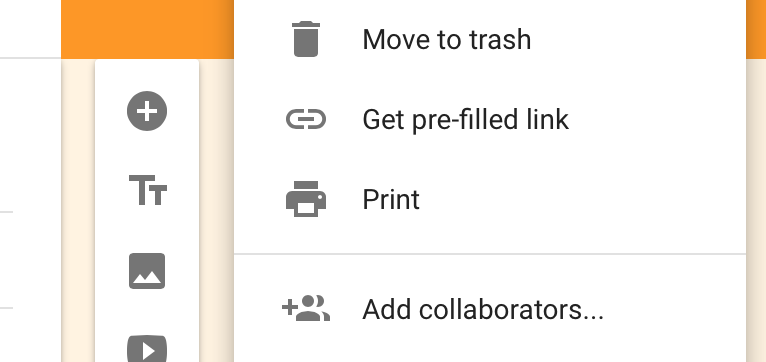
- This shoots you over to a page where you can fill in the fields you want pre-filled and it will generate a URL for you. Copy this. If you want the link you send out to everyone to have the same pre-filled info, your work is done. Send the link out!
How you might automate it
Here is my example form.Once I went through the above steps to get a pre-filled link, here is what I got:
https://docs.google.com/forms/d/1nuxTbnUGkTaZw1uGIXXgqfx3hYRi3ZaPahdwDNEgy3Q/viewform?entry.2005620554=Chuck&entry.1045781291=cagrimmett@gmail.com&entry.1065046570=308+Negra+Arroyo+Lane,+Albuquerque,+NM+87114&entry.1166974658=281-330-8004&entry.839337160=This+is+so+useful!
The stuff we are looking for is between the â=â and â&â signs:
https://docs.google.com/forms/d/1nuxTbnUGkTaZw1uGIXXgqfx3hYRi3ZaPahdwDNEgy3Q/viewform?entry.2005620554=Chuck&entry.1045781291=cagrimmett@gmail.com&entry.1065046570=308+Negra+Arroyo+Lane,+Albuquerque,+NM+87114&entry.1166974658=281-330-8004&entry.839337160=This+is+so+useful!
As you can see, those are the items I filled in on my own. How might one automate this, then? Here are a few suggestions:
- Using handlebars or Liquid, fill them in with the appropriate expressions and use the appropriate objects to fill them in: https://docs.google.com/forms/d/1nuxTbnUGkTaZw1uGIXXgqfx3hYRi3ZaPahdwDNEgy3Q/viewform?entry.2005620554=
{{name}}&entry.1045781291={{email}}&entry.1065046570={{address}}&entry.1166974658={{phone}}&entry.839337160={{comments}} - Using PHP, you might assign variables for these items and fill them in from your database with a select statement: https://docs.google.com/forms/d/1nuxTbnUGkTaZw1uGIXXgqfx3hYRi3ZaPahdwDNEgy3Q/viewform?entry.2005620554=
$name&entry.1045781291=$email&entry.1065046570=$address&entry.1166974658=$phone&entry.839337160=$comments - On Mailchimp, youâd have to use Merge Tags: https://docs.google.com/forms/d/1nuxTbnUGkTaZw1uGIXXgqfx3hYRi3ZaPahdwDNEgy3Q/viewform?entry.2005620554=
*|name|*&entry.1045781291=*|email|*&entry.1065046570=*|address|*&entry.1166974658=*|phone|*&entry.839337160=*|comments|*
Note: Make sure you are URL encoding things with weird characters and spaces like an address. Example: 308+Negra+Arroyo+Lane,+Albuquerque,+NM+87114 vs 308 Negra Arroyo Lane, Albuquerque, NM 87114
Completion of the code in 1, 2, and 3 is an instruction left to the reader. Iâm assuming that if you want to do something like generate thousands of personalized URLs to a form, you probably already have a database and know how to use it. I hope this guides you in the right direction! Email meArchived Link if you want some help.


Leave a Reply